
前言
通过分析s3c2410_ts/s3c2440_ts模块加载流程,分析linux驱动中的总线-设备-驱动模型以及输入子系统框架。
主要流程分析图示
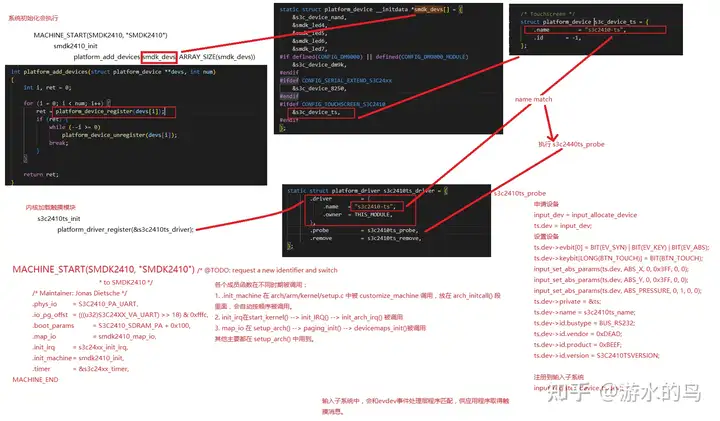
s3c2440_ts 主要流程分析
系统初始化
MACHINE_START(SMDK2410,'SMDK2410')
MACHINE_START(SMDK2410, 'SMDK2410') /* @TODO: request a new identifier and switch
* to SMDK2410 */
/* Maintainer: Jonas Dietsche */
.phys_io = S3C2410_PA_UART,
.io_pg_offst = (((u32)S3C24XX_VA_UART) >> 18) & 0xfffc,
.boot_params = S3C2410_SDRAM_PA + 0x100,
.map_io = smdk2410_map_io,
.init_irq = s3c24xx_init_irq,
.init_machine = smdk2410_init,
.timer = &s3c24xx_timer,
MACHINE_END
将上面的宏展开:
static const struct machine_desc __mach_desc_SMDK2410
__attribute_used__
__attribute__((__section__('.arch.info.init'))) = {
.nr = MACH_TYPE_SMDK2410, /* architecture number */
.name = 'SMDK2410', /* architecture name */
/* Maintainer: Jonas Dietsche */
.phys_io = S3C2410_PA_UART, /* start of physical io */
.io_pg_offst = (((u32)S3C24XX_VA_UART) >> 18) & 0xfffc,
.boot_params = S3C2410_SDRAM_PA + 0x100, /* tagged list */
.map_io = smdk2410_map_io, /* IO mapping function */
.init_irq = s3c24xx_init_irq,
.init_machine = smdk_machine_init,
.timer = &s3c24xx_timer,
}
MACHINE_START主要是定义了'struct machine_desc'的类型,放在 section('.arch.info.init'),是初始化数据,Kernel 起来之后将被丢弃。各个成员函数在不同时期被调用:
1. init_machine 在 arch/arm/kernel/setup.c 中被 customize_machine 调用,放在 arch_initcall() 段里面,会自动按顺序被调用;
2. init_irq在start_kernel() -> init_IRQ() -> init_arch_irq() 被调用;
3. map_io 在 setup_arch() -> paging_init() -> devicemaps_init()被调用;
其他主要都在 setup_arch() 中用到;
smdk2410_init
static void __init smdk2410_init(void)
{
s3c24xx_fb_set_platdata(&smdk2410_lcd_cfg);
platform_add_devices(smdk2410_devices, ARRAY_SIZE(smdk2410_devices));
smdk_machine_init();
}
smdk_machine_init
void __init smdk_machine_init(void)
{
/* Configure the LEDs (even if we have no LED support)*/
s3c2410_gpio_cfgpin(S3C2410_GPF4, S3C2410_GPF4_OUTP);
s3c2410_gpio_cfgpin(S3C2410_GPF5, S3C2410_GPF5_OUTP);
s3c2410_gpio_cfgpin(S3C2410_GPF6, S3C2410_GPF6_OUTP);
s3c2410_gpio_cfgpin(S3C2410_GPF7, S3C2410_GPF7_OUTP);
s3c2410_gpio_setpin(S3C2410_GPF4, 1);
s3c2410_gpio_setpin(S3C2410_GPF5, 1);
s3c2410_gpio_setpin(S3C2410_GPF6, 1);
s3c2410_gpio_setpin(S3C2410_GPF7, 1);
if (machine_is_smdk2443())
smdk_nand_info.twrph0 = 50;
s3c_device_nand.dev.platform_data = &smdk_nand_info;
#ifdef CONFIG_TOUCHSCREEN_S3C2410
set_s3c2410ts_info(&s3c2410_ts_cfg);
#endif
platform_add_devices(smdk_devs, ARRAY_SIZE(smdk_devs));
s3c2410_pm_init();
}
platform_add_devices
int platform_add_devices(struct platform_device **devs, int num)
{
int i, ret = 0;
for (i = 0; i < num; i++) {
ret = platform_device_register(devs[i]);
if (ret) {
while (--i >= 0)
platform_device_unregister(devs[i]);
break;
}
}
return ret;
}
platform_device_register注册smdk_devs数组中的各设备
static struct platform_device __initdata *smdk_devs[] = {
&s3c_device_nand,
&smdk_led4,
&smdk_led5,
&smdk_led6,
&smdk_led7,
#if defined(CONFIG_DM9000) || defined(CONFIG_DM9000_MODULE)
&s3c_device_dm9k,
#endif
#ifdef CONFIG_SERIAL_EXTEND_S3C24xx
&s3c_device_8250,
#endif
#ifdef CONFIG_TOUCHSCREEN_S3C2410
&s3c_device_ts,
#endif
};
自此,s3c_device_ts设备被注册到平台总线。
内核加载触摸模块
编译进内核加载驱动
编译内核设置,make menuconfig
Symbol: TOUCHSCREEN_S3C2410 [=y] │
│ Prompt: S3C2410/S3C2440 touchscreens │
│ Defined at drivers/input/touchscreen/Kconfig:14 │
│ Depends on: !S390 && INPUT && INPUT_TOUCHSCREEN │
│ Location: │
│ -> Device Drivers │
│ -> Input device support │
│ -> Generic input layer (needed for keyboard, mouse, ...) (INPUT [=y]) │
│ -> Touchscreens (INPUT_TOUCHSCREEN [=y])
然后make uImage,将s3c2410_ts驱动编译进内核,系统启动便会加载,即执行驱动的s3c2410ts_init函数。
驱动被加载调用其初始化函数s3c2410ts_init
static int __init s3c2410ts_init(void)
{
// init_MUTEX(&gADClock);
return platform_driver_register(&s3c2410ts_driver);
}
s3c2410ts_driver结构体
static struct platform_driver s3c2410ts_driver = {
.driver = {
.name = 's3c2410-ts',
.owner = THIS_MODULE,
},
.probe = s3c2410ts_probe,
.remove = s3c2410ts_remove,
};
自此,s3c2410_ts驱动被注册到平台总线。
平台总线-设备-驱动模型
s3c2410_ts设备通过platform_device_register注册到平台总线。
s3c2410_ts驱动通过platform_driver_register注册到平台总线。
在总线层处,调用s3c2410_ts驱动的probe函数。
调用s3c2410_ts驱动的probe函数的过程
platform_driver_register->
driver_register->
bus_add_driver->
driver_attach->
bus_for_each_dev->
__driver_attach->
driver_probe_device->
really_probe->
drv->probe(dev)
__driver_attach(kernel 2.6.22)
static int __driver_attach(struct device * dev, void * data)
{
struct device_driver * drv = data;
/*
* Lock device and try to bind to it. We drop the error
* here and always return 0, because we need to keep trying
* to bind to devices and some drivers will return an error
* simply if it didn't support the device.
*
* driver_probe_device() will spit a warning if there
* is an error.
*/
if (dev->parent) /* Needed for USB */
down(&dev->parent->sem);
down(&dev->sem);
if (!dev->driver)
driver_probe_device(drv, dev);
up(&dev->sem);
if (dev->parent)
up(&dev->parent->sem);
return 0;
}
__driver_attach(kernel 3.4)
static int __driver_attach(struct device *dev, void *data)
{
struct device_driver *drv = data;
/*
* Lock device and try to bind to it. We drop the error
* here and always return 0, because we need to keep trying
* to bind to devices and some drivers will return an error
* simply if it didn't support the device.
*
* driver_probe_device() will spit a warning if there
* is an error.
*/
if (!driver_match_device(drv, dev))
return 0;
if (dev->parent) /* Needed for USB */
device_lock(dev->parent);


上一篇:《Linux驱动:s3c2410/s3c2440 ts驱动分析》
下一篇:嵌入式学习笔记之点亮一个LED
推荐阅读最新更新时间:2026-03-21 04:12

 Linux技术手册
 智能机械臂
智能机械臂 现代雷达系统的信号设计
- LM2904DMR2G 函数发生器运算放大器的典型应用
- DEMO9RS08KA2: DEMO9RS08KA2 Demonstration Board
- MCP73871EV,MCP73871 锂离子电池充电器评估板
- STEVAL-IHM039V1,采用 STM32F415 微控制器的双电机控制演示板
- LTC1606CG 演示板、16 位、250ksps ADC
- RT8086B 3.5A、1.2MHz、同步降压转换器的典型应用
- TS4999EIJT 典型应用 免滤波器立体声 2.8 W D 类音频功率放大器,可选择 3D 音效
- LTM4615,采用 15mm-15mm 封装的完整双路和三路输出负载点模块稳压器
- LTC2415-1IGN 24 位 ADC 的典型应用电路使用电阻器阵列在励磁放大器中提供精确匹配
- 使用 Analog Devices 的 LTC1450LIN 的参考设计
 BFR340T






 京公网安备 11010802033920号