
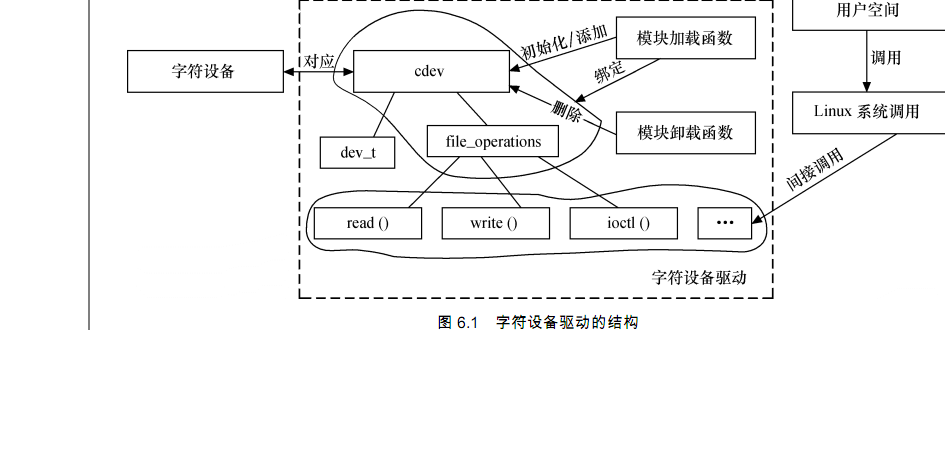
cdev结构体
1 struct cdev {
2 struct kobject kobj; /* 内嵌的 kobject 对象 */
3 struct module *owner; /*所属模块*/
4 struct file_operations *ops; /*文件操作结构体*/
5 struct list_head list;
6 dev_t dev; /*设备号*/
7 unsigned int count;
8 };
1.struct file_operations {
2 struct module *owner;
3 /* 拥有该结构的模块的指针,一般为 THIS_MODULES */
4 loff_t(*llseek)(struct file *, loff_t, int);
5 /* 用来修改文件当前的读写位置 */
6 ssize_t(*read)(struct file *, char _ _user *, size_t, loff_t*);
7 /* 从设备中同步读取数据 */
8 ssize_t(*write)(struct file *, const char _ _user *, size_t, loff_t*);
9 /* 向设备发送数据*/
10 ssize_t(*aio_read)(struct kiocb *, char _ _user *, size_t, loff_t);
11 /* 初始化一个异步的读取操作*/
12 ssize_t(*aio_write)(struct kiocb *, const char _ _user *, size_t, loff_t);
13 /* 初始化一个异步的写入操作*/
14 int(*readdir)(struct file *, void *, filldir_t);
15 /* 仅用于读取目录,对于设备文件,该字段为 NULL */
16 unsigned int(*poll)(struct file *, struct poll_table_struct*);
17 /* 轮询函数,判断目前是否可以进行非阻塞的读取或写入*/
18 int(*ioctl)(struct inode *, struct file *, unsigned int, unsigned long);
19 /* 执行设备 I/O 控制命令*/
20 long(*unlocked_ioctl)(struct file *, unsigned int, unsigned long);
21 /* 不使用 BLK 的文件系统,将使用此种函数指针代替 ioctl */
22 long(*compat_ioctl)(struct file *, unsigned int, unsigned long);
23 /* 在 64 位系统上,32 位的 ioctl 调用,将使用此函数指针代替*/
24 int(*mmap)(struct file *, struct vm_area_struct*);
25 /* 用于请求将设备内存映射到进程地址空间*/
26 int(*open)(struct inode *, struct file*);
27 /* 打开 */
28 int(*flush)(struct file*);
29 int(*release)(struct inode *, struct file*);
30 /* 关闭*/
31 int (*fsync) (struct file *, struct dentry *, int datasync);
32 /* 刷新待处理的数据*/
33 int(*aio_fsync)(struct kiocb *, int datasync);
34 /* 异步 fsync */
35 int(*fasync)(int, struct file *, int);
36 /* 通知设备 FASYNC 标志发生变化*/
37 int(*lock)(struct file *, int, struct file_lock*);
38 ssize_t(*sendpage)(struct file *, struct page *, int, size_t, loff_t *, int);
39 /* 通常为 NULL */
40 unsigned long(*get_unmapped_area)(struct file *,unsigned long, unsigned long,
41 unsigned long, unsigned long);
42 /* 在当前进程地址空间找到一个未映射的内存段 */
43 int(*check_flags)(int);
44 /* 允许模块检查传递给 fcntl(F_SETEL...)调用的标志 */
45 int(*dir_notify)(struct file *filp, unsigned long arg);
46 /* 对文件系统有效,驱动程序不必实现*/
47 int(*flock)(struct file *, int, struct file_lock*);
48 ssize_t (*splice_write)(struct pipe_inode_info *, struct file *, loff_t *, size_t,
49 unsigned int); /* 由 VFS 调用,将管道数据粘接到文件 */
50 ssize_t (*splice_read)(struct file *, loff_t *, struct pipe_inode_info *, size_t,
51 unsigned int); /* 由 VFS 调用,将文件数据粘接到管道 */
52 int (*setlease)(struct file *, long, struct file_lock **);
53 };
Linux 2.6 内核提供了一组函数用于操作 cdev 结构体:
void cdev_init(struct cdev *, struct file_operations *); 用于初始化 cdev 的成员,并建立 cdev 和 file_operations 之间的连接
struct cdev *cdev_alloc(void); cdev_alloc()函数用于动态申请一个 cdev 内存
void cdev_put(struct cdev *p);
int cdev_add(struct cdev *, dev_t, unsigned); cdev_add()函数和 cdev_del()函数分别向系统添加和删除一个 cdev,完成字符设备的注册和注
销。对 cdev_add()的调用通常发生在字符设备驱动模块加载函数中,而对 cdev_del()函数的调用则
通常发生在字符设备驱动模块卸载函数中。
void cdev_del(struct cdev *);
cdev 结构体的 dev_t 成员定义了设备号,为 32 位,其中 12 位主设备号,20 位次设备号。使
用下列宏可以从 dev_t 获得主设备号和次设备号:
MAJOR(dev_t dev)
MINOR(dev_t dev)
而使用下列宏则可以通过主设备号和次设备号生成 dev_t:
MKDEV(int major, int minor)
分配和释放设备号
int register_chrdev_region(dev_t from, unsigned count, const char *name);
int alloc_chrdev_region(dev_t *dev, unsigned baseminor, unsigned count, const char *name);
void unregister_chrdev_region(dev_t from, unsigned count);
Linux字符设备的组成
1 /* 设备结构体
2 struct xxx_dev_t {
3 struct cdev cdev;
4 ...
5 } xxx_dev;
6 /* 设备驱动模块加载函数
7 static int _ _init xxx_init(void)
8 {
9 ...
10 cdev_init(&xxx_dev.cdev, &xxx_fops); /* 初始化 cdev */
11 xxx_dev.cdev.owner = THIS_MODULE;
12 /* 获取字符设备号*/
13 if (xxx_major) {
14 register_chrdev_region(xxx_dev_no, 1, DEV_NAME);
15 } else {
16 alloc_chrdev_region(&xxx_dev_no, 0, 1, DEV_NAME);
17 }
18
19 ret = cdev_add(&xxx_dev.cdev, xxx_dev_no, 1); /* 注册设备*/
20 ...
21 }
22 /*设备驱动模块卸载函数*/
23 static void _ _exit xxx_exit(void)
24 {
25 unregister_chrdev_region(xxx_dev_no, 1); /* 释放占用的设备号*/
26 cdev_del(&xxx_dev.cdev); /* 注销设备*/
27 ...
28 }
29 module_init(xxx_init);
30 module_exit(xxx_exit);
字符设备驱动的 file_operations 结构体中成员函数
1 /* 读设备*/
2 ssize_t xxx_read(struct file *filp, char __user *buf, size_t count,
3 loff_t*f_pos)
4 {
5 ...
6 copy_to_user(buf, ..., ...);
7 ...
8 }
9 /* 写设备*/
10 ssize_t xxx_write(struct file *filp, const char __user *buf, size_t count,
11 loff_t *f_pos)
12 {
13 ...
14 copy_from_user(..., buf, ...);
15 ...
16 }
17 /* ioctl 函数 */
18 int xxx_ioctl(struct inode *inode, struct file *filp, unsigned int cmd,
19 unsigned long arg)
20 {
21 ...
22 switch (cmd) {
23 case XXX_CMD1:
24 ...
25 break;
26 case XXX_CMD2:
27 ...
28 break;
29 default:
30 /* 不能支持的命令 */
31 return - ENOTTY;
32 }
33 return 0;
34 }
设备驱动的读函数中,filp 是文件结构体指针,buf 是用户空间内存的地址,该地址在内核空
间不能直接读写,count 是要读的字节数,f_pos 是读的位置相对于文件开头的偏移。
写函数同理
由于内核空间与用户空间的内存不能直接互访,因此借助了函数 copy_from_user()完成用户空间
到内核空间的拷贝,以及copy_to_user()完成内核空间到用户空间的拷贝,见代码第6行和第14行。
完成内核空间和用户空间内存拷贝的 copy_from_user()和 copy_to_user()的原型分别为:
unsigned long copy_from_user(void *to, const void __user *from, unsigned long count);
unsigned long copy_to_user(void __user *to, const void *from, unsigned long count);
上述函数均返回不能被复制的字节数,因此,如果完全复制成功,返回值为 0。
在字符设备驱动中,需要定义一个 file_operations 的实例,并将具体设备驱动的函数赋值给
file_operations 的成员,例如:
1 struct file_operations xxx_fops = {
2 .owner = THIS_MODULE,
3 .read = xxx_read,
4 .write = xxx_write,
5 .ioctl = xxx_ioctl,
6 ...
7 }
上一篇:Smart210---LED驱动
下一篇:Smart210学习记录-------文件操作
推荐阅读最新更新时间:2026-03-25 11:47

 Linux技术手册
 【2025 DigiKey创意大赛】 学伴智盒 - 代码
 智能机械臂
智能机械臂 非常经典的关于LLC的杨波博士论文
- 用于 7VIN 至 16VIN、1.5V 和 1.2V 输出的 LTM4628EV DC/DC 模块稳压器的典型应用电路
- 使用 Analog Devices 的 LTC3728LIGN 的参考设计
- DER-406 - 适用于 A19 灯的 5.76 W 高 PF 非隔离降压-升压型 TRIAC 调光 LED 驱动器
- ADR5045B 5V 输出精密微功率并联模式电压基准的典型应用
- LT3970EDDB-3.42 2.5V 降压转换器的典型应用
- MC78M08BDTG 8V 电流调节器的典型应用
- LT1021DCN8-5 精密电压基准的典型应用
- DER-282 - 100W, 扁平(11 mm), LLC DC-DC转换器
- REF193 低压差开尔文连接电压基准的典型应用电路
- LT3088EM 线性稳压器用于添加软启动的典型应用
 1CIS223-04TG3M






 京公网安备 11010802033920号