
这段时间一直在研究ecos,所以有了把ecos移植到mini2440的qemu平台的想法。经过几天的折腾,终于可以在qemu的上面看到redboot的命令了。
先看看成果,然后进入枯燥的coding历程
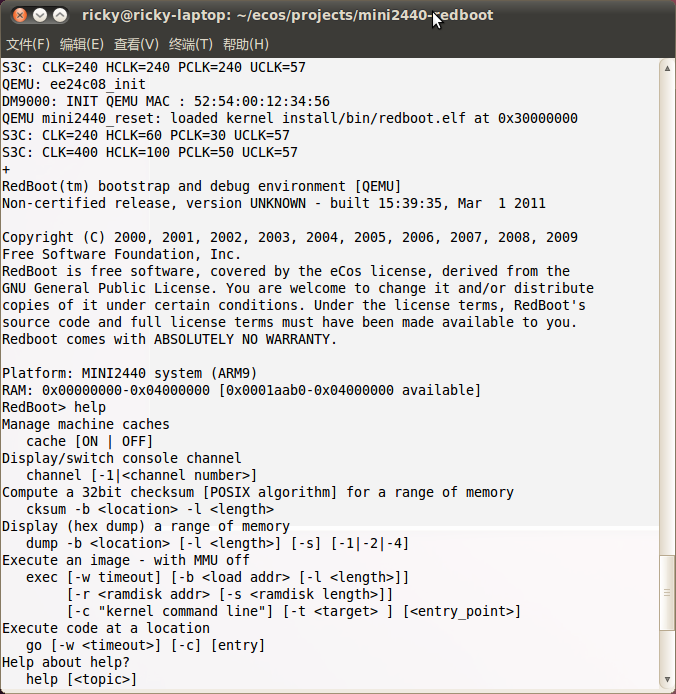
现在开始看代码,:-)
1. 获得代码
git clone git://repo.or.cz/qemu/mini2440.git qemu
修改启动部分为ram的最小地址直接启动
ricky@ricky-laptop:~/ecos/projects/mini2440-qemu/mini2440$ git diff
diff --git a/hw/mini2440.c b/hw/mini2440.c
index 5decf4b..7a70aae 100644
--- a/hw/mini2440.c
+++ b/hw/mini2440.c
@@ -258,46 +258,15 @@ static void mini2440_reset(void *opaque)
struct mini2440_board_s *s = (struct mini2440_board_s *) opaque;
uint32_t image_size;
- /*
- * Normally we would load 4 KB of nand to SRAM and jump there, but
- * it is not working perfectly as expected, so we cheat and load
- * it from nand directly relocated to 0x33f80000 and jump there
- */
- if (mini2440_load_from_nand(s->nand, 0, S3C_RAM_BASE | 0x03f80000, 256*1
- mini2440_printf('loaded default u-boot from NAND/n');
- s->cpu->env->regs[15] = S3C_RAM_BASE | 0x03f80000; /* start addr
- }
-#if 0 && defined(LATER)
- if (mini2440_load_from_nand(s->nand, 0, S3C_SRAM_BASE_NANDBOOT, S3C_SRAM
- s->cpu->env->regs[15] = S3C_SRAM_BASE_NANDBOOT; /* start address
- mini2440_printf('4KB SteppingStone loaded from NAND/n');
- }
-#endif
:
diff --git a/hw/mini2440.c b/hw/mini2440.c
index 5decf4b..7a70aae 100644
--- a/hw/mini2440.c
+++ b/hw/mini2440.c
@@ -258,46 +258,15 @@ static void mini2440_reset(void *opaque)
struct mini2440_board_s *s = (struct mini2440_board_s *) opaque;
uint32_t image_size;
- /*
- * Normally we would load 4 KB of nand to SRAM and jump there, but
- * it is not working perfectly as expected, so we cheat and load
- * it from nand directly relocated to 0x33f80000 and jump there
- */
- if (mini2440_load_from_nand(s->nand, 0, S3C_RAM_BASE | 0x03f80000, 256*10
- mini2440_printf('loaded default u-boot from NAND/n');
- s->cpu->env->regs[15] = S3C_RAM_BASE | 0x03f80000; /* start addre
- }
-#if 0 && defined(LATER)
- if (mini2440_load_from_nand(s->nand, 0, S3C_SRAM_BASE_NANDBOOT, S3C_SRAM_
- s->cpu->env->regs[15] = S3C_SRAM_BASE_NANDBOOT; /* start address,
- mini2440_printf('4KB SteppingStone loaded from NAND/n');
- }
-#endif
- /*
:
diff --git a/hw/mini2440.c b/hw/mini2440.c
index 5decf4b..7a70aae 100644
--- a/hw/mini2440.c
+++ b/hw/mini2440.c
@@ -258,46 +258,15 @@ static void mini2440_reset(void *opaque)
struct mini2440_board_s *s = (struct mini2440_board_s *) opaque;
uint32_t image_size;
- /*
- * Normally we would load 4 KB of nand to SRAM and jump there, but
- * it is not working perfectly as expected, so we cheat and load
- * it from nand directly relocated to 0x33f80000 and jump there
- */
- if (mini2440_load_from_nand(s->nand, 0, S3C_RAM_BASE | 0x03f80000, 256*102
- mini2440_printf('loaded default u-boot from NAND/n');
- s->cpu->env->regs[15] = S3C_RAM_BASE | 0x03f80000; /* start addres
- }
-#if 0 && defined(LATER)
- if (mini2440_load_from_nand(s->nand, 0, S3C_SRAM_BASE_NANDBOOT, S3C_SRAM_S
- s->cpu->env->regs[15] = S3C_SRAM_BASE_NANDBOOT; /* start address,
- mini2440_printf('4KB SteppingStone loaded from NAND/n');
- }
-#endif
- /*
- * if a u--boot is available as a file, we always use it
:
diff --git a/hw/mini2440.c b/hw/mini2440.c
index 5decf4b..7a70aae 100644
--- a/hw/mini2440.c
+++ b/hw/mini2440.c
@@ -258,46 +258,15 @@ static void mini2440_reset(void *opaque)
struct mini2440_board_s *s = (struct mini2440_board_s *) opaque;
uint32_t image_size;
- /*
- * Normally we would load 4 KB of nand to SRAM and jump there, but
- * it is not working perfectly as expected, so we cheat and load
- * it from nand directly relocated to 0x33f80000 and jump there
- */
- if (mini2440_load_from_nand(s->nand, 0, S3C_RAM_BASE | 0x03f80000, 256*1024)>
- mini2440_printf('loaded default u-boot from NAND/n');
- s->cpu->env->regs[15] = S3C_RAM_BASE | 0x03f80000; /* start address,
- }
-#if 0 && defined(LATER)
- if (mini2440_load_from_nand(s->nand, 0, S3C_SRAM_BASE_NANDBOOT, S3C_SRAM_SIZE
- s->cpu->env->regs[15] = S3C_SRAM_BASE_NANDBOOT; /* start address, u-b
- mini2440_printf('4KB SteppingStone loaded from NAND/n');
- }
-#endif
- /*


上一篇:ecos on QEMU for mini2440 编译方法
下一篇:minigui1.6移植到mini2440
推荐阅读最新更新时间:2026-03-22 20:56

 锁相环性能仿真与设计(英文)
 FollowMeS3E3代码
 Follow me第三季第4期任务汇总代码(MicroPython版)
 非常经典的关于LLC的杨波博士论文
- LT3088IDD 宽安全工作区电源的典型应用
- 使用 Analog Devices 的 LT3663IDCB-3.3 的参考设计
- ADR425 可编程 DAC 参考的典型应用
- LT4276BIUFD 25.5W(类型 2)PoE+ 电源在反激模式下的典型应用电路,具有 24V、1A 输出
- 具有浪涌电流限制的低待机损耗功率前端
- LT4275AHMS IEEE 802.3at(类型 2)25.5W 受电设备的典型应用电路
- 采用 MSP430 电容式触控 MCU、触觉元件和 LCD 的 MSP432 MCU 参考设计
- 具有 6uA 反向泄漏电流的 LT1767EMS8E-3.3 双源电源的典型应用电路
- DER-282 - 使用HiperLCSTM LCS700HG设计的100 W超薄 (11 mm) LLC DC-DC转换器
- UART转USB桥接器
 XC6406PP60DL






 京公网安备 11010802033920号