
一、概述
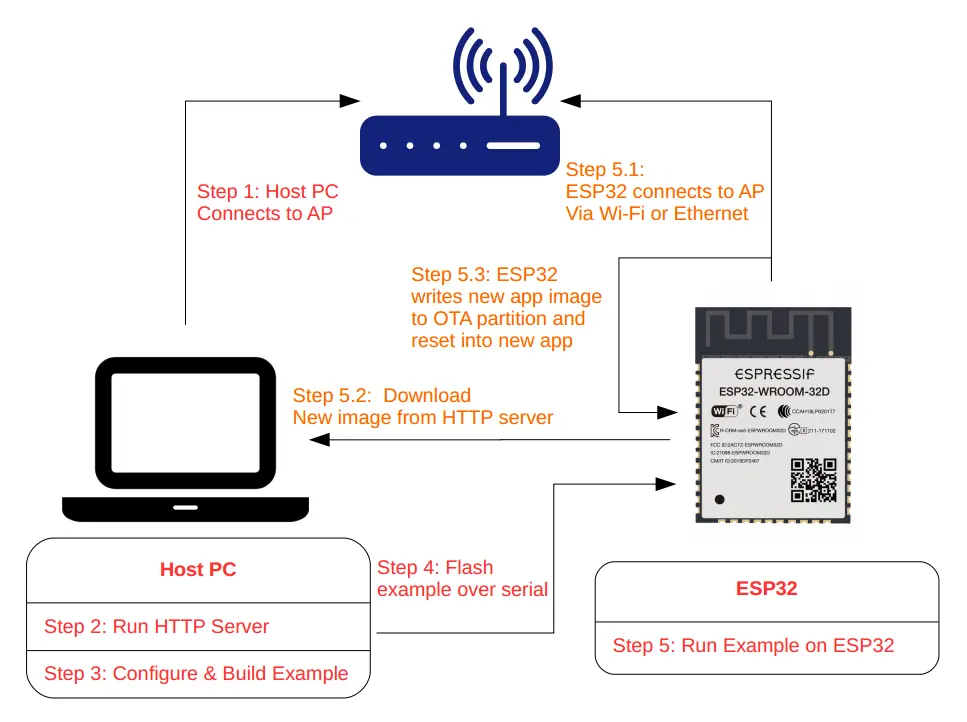
ESP32应用程序可以在运行时通过Wi-Fi或以太网从特定的服务器下载新映像,然后将其闪存到某些分区中,从而进行升级。
在ESP-IDF中有两种方式可以进行空中(OTA)升级:
使用 app_update 组件提供的原生API
使用 esp_https_ota 组件提供的简化API,它在原生OTA API上添加了一个抽象层,以便使用HTTPS协议进行升级。
分别在 native_ota_example 和 simple_ota_example 下的OTA示例中演示了这两种方法。
1.1 OTA工作流程
1.2 OTA数据分区
ESP32 SPI Flash 内有与升级相关的(至少)四个分区:OTA data、Factory App、OTA_0、OTA_1。其中 FactoryApp 内存有出厂时的默认固件。
首次进行 OTA 升级时,OTA Demo 向 OTA_0 分区烧录目标固件,并在烧录完成后,更新 OTA data 分区数据并重启。
系统重启时获取 OTA data 分区数据进行计算,决定此后加载 OTA_0 分区的固件执行(而不是默认的 Factory App 分区内的固件),从而实现升级。
同理,若某次升级后 ESP32 已经在执行 OTA_0 内的固件,此时再升级时 OTA Demo 就会向 OTA_1 分区写入目标固件。再次启动后,执行 OTA_1 分区实现升级。以此类推,升级的目标固件始终在 OTA_0、OTA_1 两个分区之间交互烧录,不会影响到出厂时的 Factory App 固件。
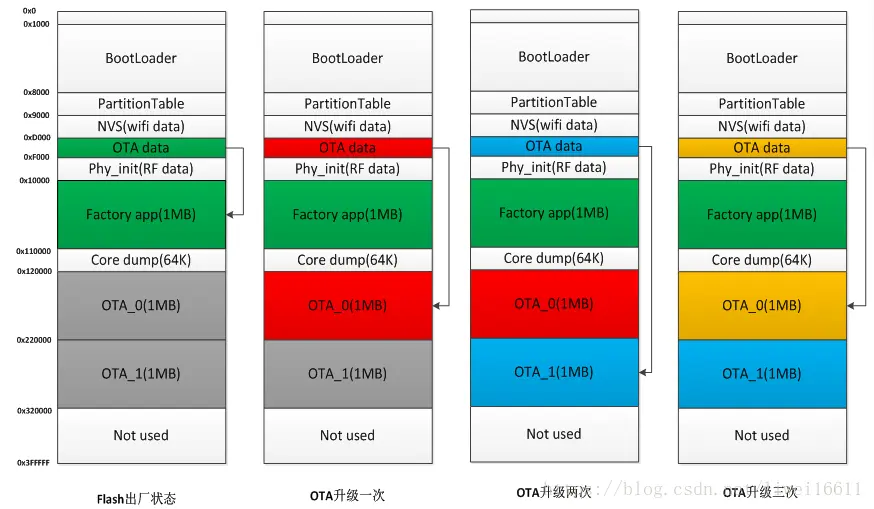
为了简单起见,OTA示例通过在menuconfig中启用CONFIG_PARTITION_TABLE_TWO_OTA选项来选择预定义的分区表,该选项支持三个应用程序分区:工厂分区、OTA_0分区和OTA_1分区。有关分区表的更多信息,请参阅分区表.
二、API说明
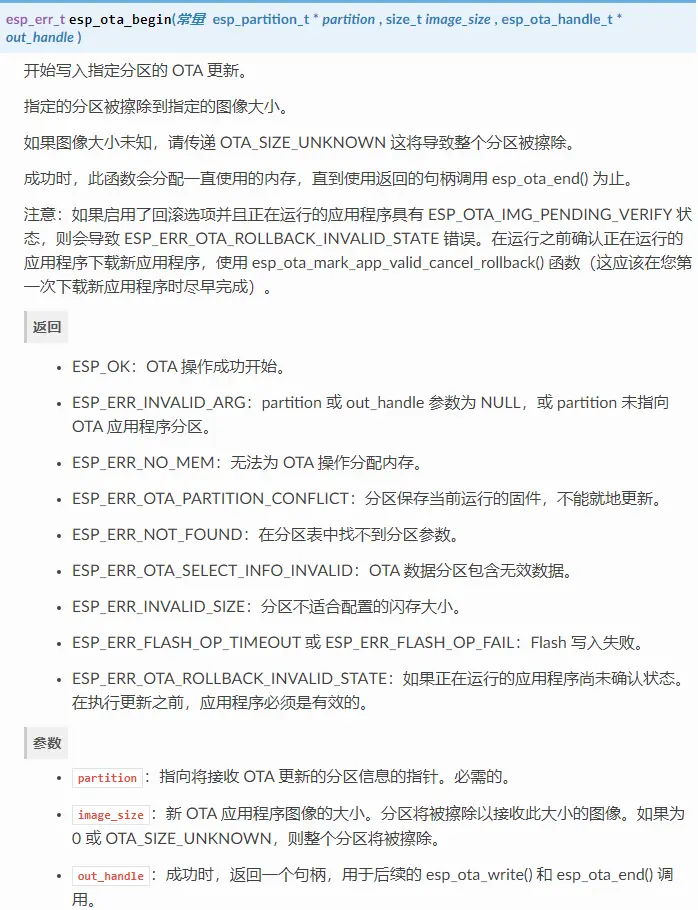
以下原生 OTA 接口位于 app_update/include/esp_ota_ops.h。
2.1 esp_ota_begin
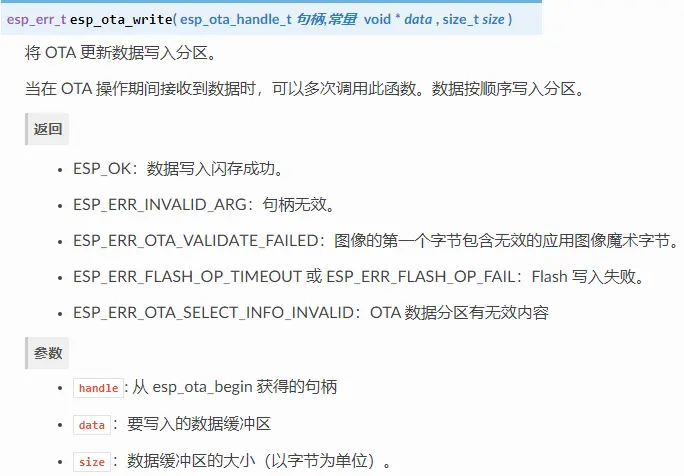
2.2 esp_ota_write
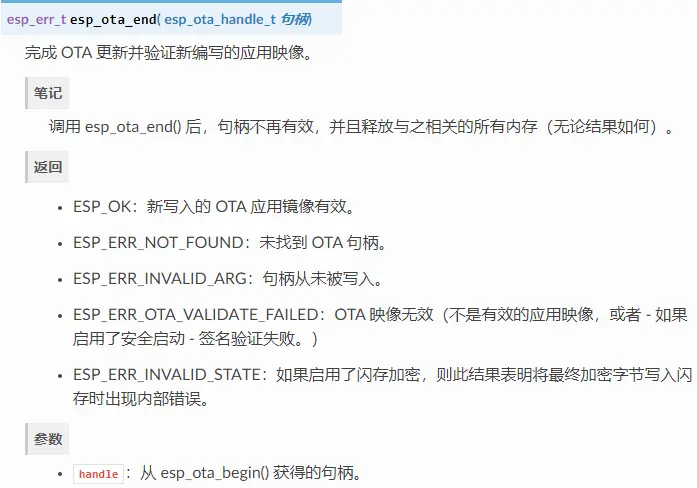
2.3 esp_ota_end
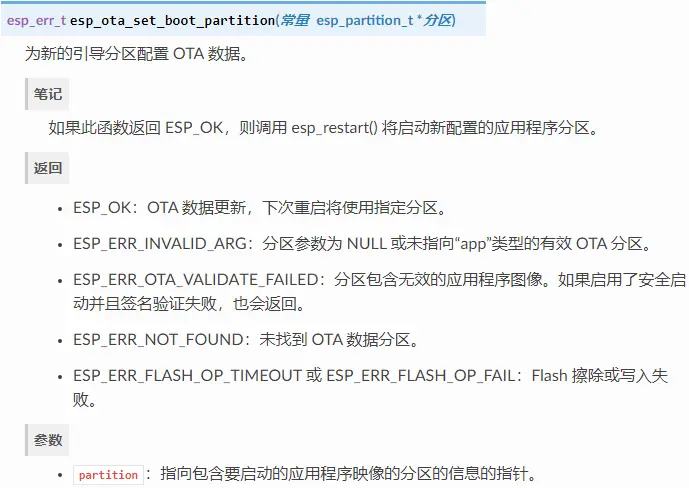
2.4 esp_ota_set_boot_partition
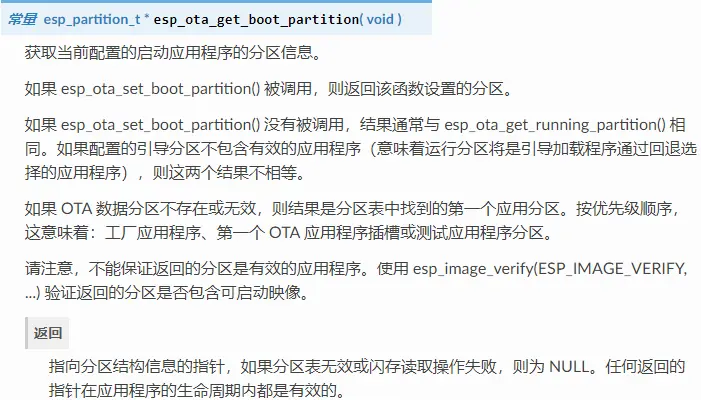
2.5 esp_ota_get_boot_partition
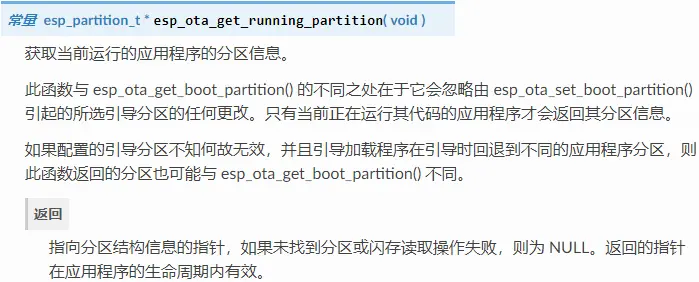
2.6 esp_ota_get_running_partition
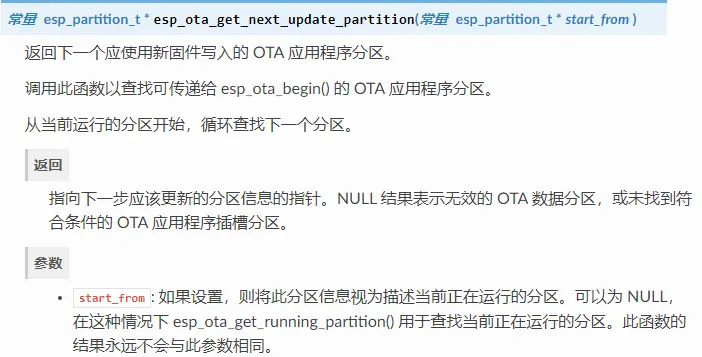
2.7 esp_ota_get_next_update_partition
三、编程流程
3.1 OTA详细过程逻辑
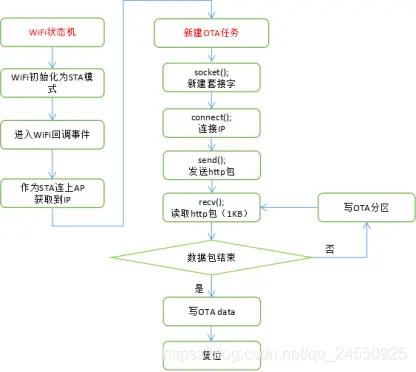
3.2 OTA分区操作流程
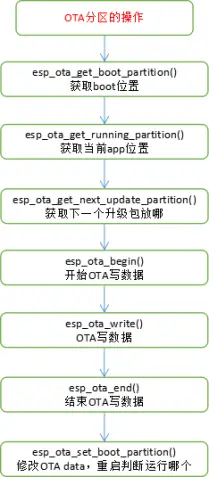
节选自 esp-idfexamplessystemotanative_ota_example 中的例程
static void ota_example_task(void *pvParameter){
esp_err_t err;
/* update handle : set by esp_ota_begin(), must be freed via esp_ota_end() */
esp_ota_handle_t update_handle = 0 ;
const esp_partition_t *update_partition = NULL;
ESP_LOGI(TAG, 'Starting OTA example');
//获取OTA app存放的位置
const esp_partition_t *configured = esp_ota_get_boot_partition();
//获取当前系统执行的固件所在的Flash分区
const esp_partition_t *running = esp_ota_get_running_partition();
if (configured != running) {
ESP_LOGW(TAG, 'Configured OTA boot partition at offset 0x%08x, but running from offset 0x%08x',
configured->address, running->address);
ESP_LOGW(TAG, '(This can happen if either the OTA boot data or preferred boot image become corrupted somehow.)');
}
ESP_LOGI(TAG, 'Running partition type %d subtype %d (offset 0x%08x)',
running->type, running->subtype, running->address);
esp_http_client_config_t config = {
.url = CONFIG_EXAMPLE_FIRMWARE_UPG_URL,
.cert_pem = (char *)server_cert_pem_start,
.timeout_ms = CONFIG_EXAMPLE_OTA_RECV_TIMEOUT,
};#ifdef CONFIG_EXAMPLE_FIRMWARE_UPGRADE_URL_FROM_STDIN
char url_buf[OTA_URL_SIZE];
if (strcmp(config.url, 'FROM_STDIN') == 0) {
example_configure_stdin_stdout();
fgets(url_buf, OTA_URL_SIZE, stdin);
int len = strlen(url_buf);
url_buf[len - 1] = '';
config.url = url_buf;
} else {
ESP_LOGE(TAG, 'Configuration mismatch: wrong firmware upgrade image url');
abort();
}#endif#ifdef CONFIG_EXAMPLE_SKIP_COMMON_NAME_CHECK
config.skip_cert_common_name_check = true;#endif
esp_http_client_handle_t client = esp_http_client_init(&config);
if (client == NULL) {
ESP_LOGE(TAG, 'Failed to initialise HTTP connection');
task_fatal_error();
}
//连http服务器
err = esp_http_client_open(client, 0);
if (err != ESP_OK) {
ESP_LOGE(TAG, 'Failed to open HTTP connection: %s', esp_err_to_name(err));
esp_http_client_cleanup(client);
task_fatal_error();
}
esp_http_client_fetch_headers(client);
//获取当前系统下一个(紧邻当前使用的OTA_X分区)可用于烧录升级固件的Flash分区
update_partition = esp_ota_get_next_update_partition(NULL);
ESP_LOGI(TAG, 'Writing to partition subtype %d at offset 0x%x',
update_partition->subtype, update_partition->address);
assert(update_partition != NULL);
int binary_file_length = 0;
/*deal with all receive packet*/
bool image_header_was_checked = false;
while (1) {
int data_read = esp_http_client_read(client, ota_write_data, BUFFSIZE);
if (data_read < 0) {
ESP_LOGE(TAG, 'Error: SSL data read error');
http_cleanup(client);
task_fatal_error();
} else if (data_read > 0) {
if (image_header_was_checked == false) {
esp_app_desc_t new_app_info;
if (data_read > sizeof(esp_image_header_t) + sizeof(esp_image_segment_header_t) + sizeof(esp_app_desc_t)) {
// check current version with downloading
memcpy(&new_app_info, &ota_write_data[sizeof(esp_image_header_t) + sizeof(esp_image_segment_header_t)], sizeof(esp_app_desc_t));
ESP_LOGI(TAG, 'New firmware version: %s', new_app_info.version);
esp_app_desc_t running_app_info;
if (esp_ota_get_partition_description(running, &running_app_info) == ESP_OK) {
ESP_LOGI(TAG, 'Running firmware version: %s', running_app_info.version);
}
const esp_partition_t* last_invalid_app = esp_ota_get_last_invalid_partition();
esp_app_desc_t invalid_app_info;
if (esp_ota_get_partition_description(last_invalid_app, &invalid_app_info) == ESP_OK) {
ESP_LOGI(TAG, 'Last invalid firmware version: %s', invalid_app_info.version);
}
// check current version with last invalid partition
if (last_invalid_app != NULL) {
if (memcmp(invalid_app_info.version, new_app_info.version, sizeof(new_app_info.version)) == 0) {
ESP_LOGW(TAG, 'New version is the same as invalid version.');
ESP_LOGW(TAG, 'Previously, there was an attempt to launch the firmware with %s version, but it failed.', invalid_app_info.version);
ESP_LOGW(TAG, 'The firmware has been rolled back to the previous version.');
http_cleanup(client);
infinite_loop();
}
}#ifndef CONFIG_EXAMPLE_SKIP_VERSION_CHECK
if (memcmp(new_app_info.version, running_app_info.version, sizeof(new_app_info.version)) == 0) {
ESP_LOGW(TAG, 'Current running version is the same as a new. We will not continue the update.');
http_cleanup(client);
infinite_loop();
}#endif
image_header_was_checked = true;
//OTA写开始
err = esp_ota_begin(update_partition, OTA_SIZE_UNKNOWN, &update_handle);
if (err != ESP_OK) {
ESP_LOGE(TAG, 'esp_ota_begin failed (%s)', esp_err_to_name(err));
http_cleanup(client);
task_fatal_error();
}
ESP_LOGI(TAG, 'esp_ota_begin succeeded');
} else {
ESP_LOGE(TAG, 'received package is not fit len');
http_cleanup(client);


上一篇:ThreadX移植——STM32H7+MDK-AC6平台
下一篇:ESP32学习笔记(23)——NVS(非易失性存储)接口使用
推荐阅读最新更新时间:2026-03-18 16:46

 API调用模型小助手-桌面版
 FollowMeS3E3代码
 Windows API 函数参考手册
 【Follow me第三季第3期】代码
 现代雷达系统的信号设计
- AZ7045RTR低压指示检测器典型应用电路
- LTM4608AMPY 3V 至 5.5Vin、2.5V/8A 输出 DC/DC 稳压器的典型应用电路
- 使用 L6562A 的恒流反向降压 LED 驱动器
- EP53A7HQI 1A同步降压稳压器典型应用电路
- OP284FSZ 缓冲网络补偿容性负载的典型应用
- EVAL-AD5116SDZ,用于仪表的 AD5116 数字电位器的评估板
- 用于音频的 4 通道 D 类音频功率放大器
- 使用 ON Semiconductor 的 ML4841 的参考设计
- LT3755IUD-1 降压模式 500mA LED 驱动器的典型应用电路,用于 20kHz PWM 调光
- RDR-669 - 使用 LinkSwitch-CV 的 5 W、85-265 VAC、恒压 (CV) 适配器
 BFR340T






 京公网安备 11010802033920号