
开发环境 :
-- 操作系统 : Vmware11 + RedHat6.3 企业版 + Win8.1;
-- 硬件 : OK-6410-A 开发板, JLink;
一. 编译并烧写裸板程序示例
1. 设置交叉编译工具
OK-6410-A 使用 4.3.2 的交叉编译工具链, 将交叉编译工具链设置成 Ubuntu 的默认交叉编译工具链;
安装交叉编译工具链 : 解压 arm-linux-gcc-4.3.2.tgz 文件
-- 安装命令 : 使用命令 tar -xvzf arm-linux-gcc-4.3.2.tgz -C /, 由于 tgz 压缩文件内也是存在目录结构, 解压后, 交叉编译工具链直接解压到了 /usr/local/arm/4.3.2 目录;
-- 配置环境变量 : 环境变量在 /etc/profile 中配置, 在该文件中添加如下代码 :
ARM_LINUX='/usr/local/arm/4.3.2/bin'
export PATH=$PATH:$ARM_LINUX
-- 使配置文件生效 : 执行 source /etc/profile 命令, 该配置即可生效, 执行 arm-linux 按 tab 键 :
octopus@octopus:~$ arm-linux-
arm-linux-addr2line arm-linux-c++filt arm-linux-gcc-4.3.2 arm-linux-gprof arm-linux-objdump arm-linux-sprite
arm-linux-ar arm-linux-cpp arm-linux-gcov arm-linux-ld arm-linux-ranlib arm-linux-strings
arm-linux-as arm-linux-g++ arm-linux-gdb arm-linux-nm arm-linux-readelf arm-linux-strip
arm-linux-c++ arm-linux-gcc arm-linux-gdbtui arm-linux-objcopy arm-linux-size
2. 编译代码
(1) 代码示例
代码直接是开发板的示例代码:
-- led.S :
octopus@octopus:~/arm/01_code$ more led.S
.text
.globl _start
#define VIC0_INT	0x71200000
#define VIC1_INT	0x71300000

_start: bl reset
		ldr	pc, _undefined_instruction
		ldr	pc, _software_interrupt
		ldr	pc, _prefetch_abort
		ldr	pc, _data_abort
		ldr	pc, _not_used
		ldr	pc, _irq
		ldr	pc, _fiq
_undefined_instruction:b .
_software_interrupt:b .
_prefetch_abort:b .
_data_abort:b .
_not_used:b .
_irq:b .
_fiq:b .
reset:
		mrs	r0,cpsr
		bic	r0,r0,#0x1f
		orr	r0,r0,#0xd3
		msr	cpsr,r0

		bl set_peri_port
		bl disable_watchdog
		bl disable_irq
		bl init_led
		bl light_led

halt:
		bl halt

set_peri_port:
@告诉cpu外设的地址
	    ldr r0, =0x70000000
	    orr r0, r0, #0x13
	    mcr p15,0,r0,c15,c2,4
		mov	pc, lr

disable_watchdog:
@关闭看门狗
		ldr r0, =0x7E004000
		mov r1, #0
		str r1, [r0] @ str, store,
		mov	pc, lr

disable_irq:
@屏蔽中断
		ldr	r1, =0x0
		ldr	r0, =VIC0_INT
		str	r1, [r0]

		ldr	r1, =0x0
		ldr	r0, =VIC1_INT
		str	r1, [r0]
		mov	pc, lr

init_led:
@设置GPN为输出模式
		ldr r1, =0x7F008820
		ldr r0, =0x1111
		str r0, [r1]
		mov	pc, lr

light_led:
@点亮LED1
		ldr r1, =0x7F008824
		mov r0, #0xf
		str r0, [r1]
	    mov r0,#0xe
	    str r0,[r1]
	    mov	pc, lr
-- led.lds :
octopus@octopus:~/arm/01_code$ more led.lds


OUTPUT_FORMAT('elf32-littlearm', 'elf32-littlearm', 'elf32-littlearm')
OUTPUT_ARCH(arm)
ENTRY(_start)
SECTIONS
{
	. = 0x50008000;

	. = ALIGN(4);
	.text :
	{
		led.o	(.text)
		*(.text)
	}

	. = ALIGN(4);
	.rodata : { *(SORT_BY_ALIGNMENT(SORT_BY_NAME(.rodata*))) }

	. = ALIGN(4);
	.data : { *(.data) }


	. = ALIGN(4);
	__bss_start = .;
	.bss (NOLOAD) : { *(.bss) . = ALIGN(4); }
	_end = .;
}
-- Makefile :
octopus@octopus:~/arm/01_code$ more Makefile
all: led.o
	arm-linux-ld -Tled.lds -o led.elf led.o
	arm-linux-objcopy -O binary led.elf led.bin

led.o : led.S
	arm-linux-gcc -g -o led.o -c led.S

.PHONY: clean
clean:
	rm *.o led.elf led.bin
(2) 编译
编译 : 在该目录执行 make 命令, 编译后多了 led.o, led.elf, led.bin 三个文件, 其中 led.bin 是要烧写到 nand flash 中的可执行二进制程序;
-- 编译前 :
octopus@octopus:~/arm/01_code$ ls
led.lds  led.S  Makefile
-- 编译后 :
octopus@octopus:~/arm/01_code$ make
arm-linux-gcc -g -o led.o -c led.S
arm-linux-ld -Tled.lds -o led.elf led.o
arm-linux-objcopy -O binary led.elf led.bin
octopus@octopus:~/arm/01_code$ ls
led.bin  led.elf  led.lds  led.o  led.S  Makefile
3. 烧写 led.bin
(1) 启动方式切换
sd 卡启动 : (1~8) 位置 : 0, 0, 0, 1, 1, 1, 1, 1;
nand flash 启动 : (1~8) 位置 : x, x, x, 1, 1, 0, 0, 1;
nor flash 启动 : (1~8) 位置 : x, x, x, 1, 0, 1, 0, x;
(2) 制作SD卡启动盘
详细过程参照 : http://blog.csdn.net/shulianghan/article/details/42254237#t42
(3) 串口操作
开发板串口方案一 -- 使用SecureCRT 串口连接 :
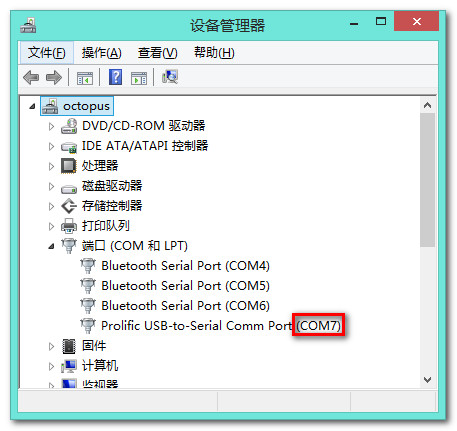
-- 设备管理器中查看串口端口 : COM7;
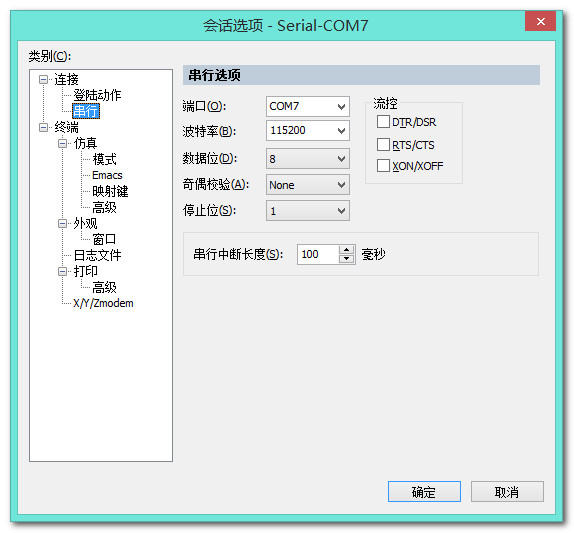
-- 串口连接属性 :
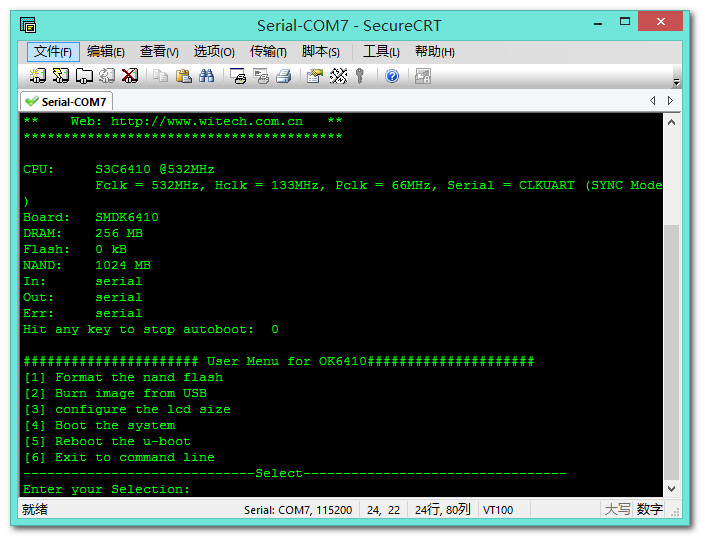
-- 连接串口 :
开发板串口方案二 -- 打开 minicom 工具 : minicom 串口调试工具;
-- 注意 : 使用 root 用户打开, sudo minicom;
sd 卡启动 :
-- 启动方式 : 插入 sd 卡, 将启动模式设置为 sd 卡启动, 即将 屏幕右侧的 8个开关设置成 (1~8) 位置 : 0, 0, 0, 1, 1, 1, 1, 1, 打开电源;
-- 注意 : 打开电源时 不停按 空格键;
-- 串口终端显示 :
U-Boot 1.1.6 (Oct 9 2012 - 13:20:58) for SMDK6410
****************************************
** u-boot 1.1.6 **
** Updated for OK6410 TE6410 Board **
** Version (2012-09-23) **
** OEM: Forlinx Embedded **
** Web: http://www.witech.com.cn **
****************************************
CPU: S3C6410 @532MHz
Fclk = 532MHz, Hclk = 133MHz, Pclk = 66MHz, Serial = CLKUART (SYNC Mode)
Board: SMDK6410
DRAM: 256 MB
Flash: 0 kB
NandFlash Information:
Nandflash:ChipType= SLC ChipName=MT29F16G08ABACAWP
No No Calc pagesize, blocksize, erasesize, use ids table .............
NandFlash:name=NAND 2GiB 1,8V 8-bit,id=38, pagesize=4096 ,chipsize=1024 MB,erasesize=524288 oobsize=128
NandFlash Size is 1024 MB
SD/MMC: SD 2.0 / Manufacturer: 0x1B,OEM: 'SM/00000',REV: 1.0,S/N: -1320320343,DATE: 2008/3
MMC/SD size: 971 MiB
Freq = 25MHz
In: serial
Out: lcd
Err: lcd
Hit any key to stop autoboot: 0
###################### User Menu for OK6410#####################
[1] Format the nand flash
[2] Burn image from SD card
[3] Burn image from USB
[4] Reboot the u-boot
[5] Exit to command line
-----------------------------Select---------------------------------
Enter your Selection:
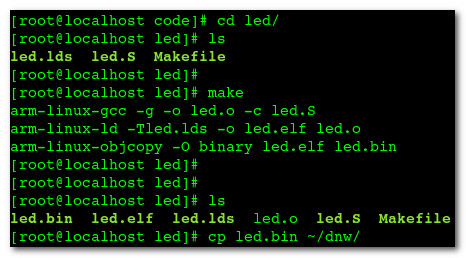
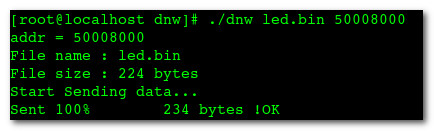
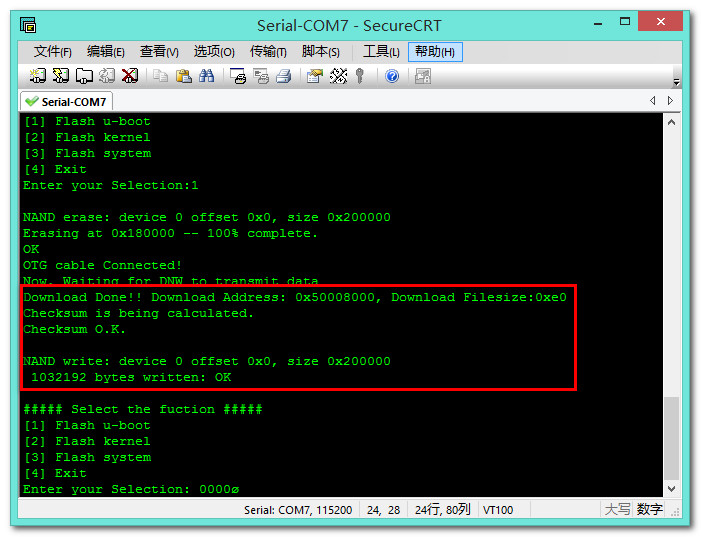
格式化 nand flash : 在上面的 minicom 命令行, 选择 1 ([1] Format the nand flash -- 格式化 nand Flash), 弹出 Really scrub this NAND flash? 选择从 usb 烧写映像 : 选择 3 ([3] Burn image from USB -- 从usb烧写映像); 选择 烧写 u-boot 类型程序 : 裸板程序都属于 u-boot 类型的; 设置虚拟机的 USB 接口 : 之前写过, 详情见 http://blog.csdn.net/shulianghan/article/details/42254237#t45 ; 编译 led 源码 : -- 进入 led 源码目录 : 执行 make 命令, 将编译后的文件 拷贝到 dnw 所在目录; 烧写 led.bin : -- 加载 dnw 驱动 : 使用 insmod dnw_usb.ko 命令; -- 烧写 led.bin : 使用 ./dnw led.bin 50008000 命令; -- 串口终端显示 : 如下显示, 烧写成功; -- 关闭开发板使用 nand flash 启动 : 可以看到 LED1 点亮; 编译下面的代码 : -- 编译执行代码 : -----------------------------Select---------------------------------
Enter your Selection:1
NAND scrub: device 0 whole chip
Warning: scrub option will erase all factory set bad blocks!
There is no reliable way to recover them.
Use this command only for testing purposes if you
are sure of what you are doing!
Really scrub this NAND flash?
-----------------------------Select---------------------------------
Enter your Selection:3

##### Select the fuction #####
[1] Flash u-boot
[2] Flash kernel
[3] Flash system
[4] Exit
Enter your Selection:
##### Select the fuction #####
[1] Flash u-boot
[2] Flash kernel
[3] Flash system
[4] Exit
Enter your Selection:1

NAND erase: device 0 offset 0x0, size 0x200000
Erasing at 0x180000 -- 100% complete.
OK
Insert a OTG cable into the connector!
(3) Linux 操作

二. 交叉工具链
1. 交叉编译器
(1) 普通编译
/*************************************************************************
> File Name: main.c
> Author: octopus
> Mail: octopus_work.163.com
> Created Time: 2015年01月03日 星期六 14时25分11秒
************************************************************************/
#include


上一篇:【嵌入式开发】ARM 芯片简介 (ARM芯片类型 | ARM处理器工作模式 | ARM 寄存器 | ARM 寻址)
下一篇:Linux驱动——LED闪烁
推荐阅读最新更新时间:2026-03-25 15:20

 Follow me第三季第4期】英飞凌 PSOC™6 蓝牙原型开发板任务代码相关资料
 Linux技术手册
 MAX32625 PICO 嵌入式程序
 现代雷达系统的信号设计
- 使用 Analog Devices 的 ADP3334 的参考设计
- LTC3588IMSE-1 5V 至 16V 太阳能供电 2.5V 电源的典型应用电路,具有用于增加输出能量存储和电池备份的超级电容器
- XRP7659、1.5A DC 至 DC 非同步降压稳压器的典型应用
- 使用 ON Semiconductor 的 NCP3120MNTX 的参考设计
- MAXREFDES1003:150mA、4通道、LED驱动器,SEPIC配置
- LTC4223-2 演示板,用于 AMC 的双电源热插拔控制器(故障后自动重试)
- MC33072ADR2G 运算放大器用作晶体管驱动器的典型应用
- 使用 Diodes Incorporated 的 AP1509-12S 的参考设计
- NCP382HD10AAGEVB:单输入双输出高侧配电开关评估板
- 使用 Analog Devices 的 AD7730 的参考设计
 BFR340T






 京公网安备 11010802033920号