
内核移植的梯度:
中极:添加内核驱动的方式方法
高级:修改或添加BSP包
linux内核特性:
可移植性强、支持的硬件平台广泛;超强的网络功能;多任务多用户系统;模块化的设计
五大子系统:
进程管理;内存管理;文件系统;网络协议;设备管理
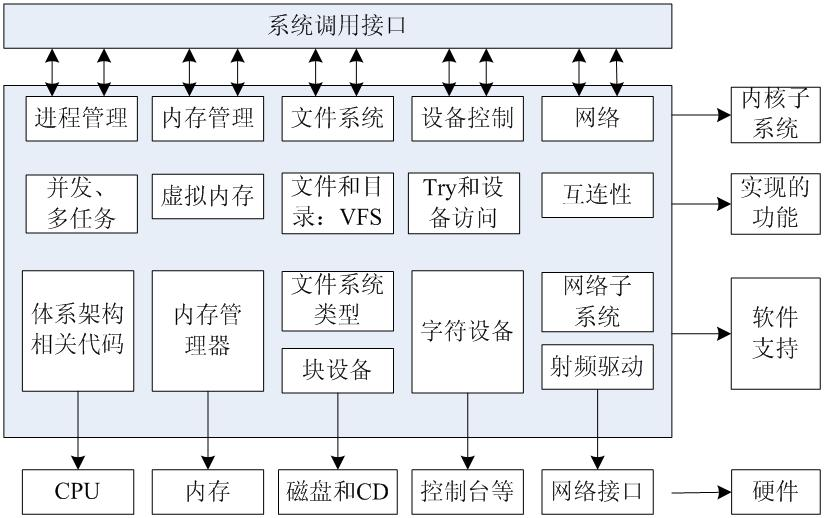
内核获取路径:芯片厂商、内核源码官方
linux内核的目录结构层次结构:

平台相关目录树:arch目录下
平台无关目录树:其它
crypto目录:算法、加密涉及的源码目录
Documentation目录:内核官方文档
fs目录:文件系统的信息
ipc目录:进程间通信的机制
mm目录:内存
driver:驱动相关
内核源码开发的头文件命名规范
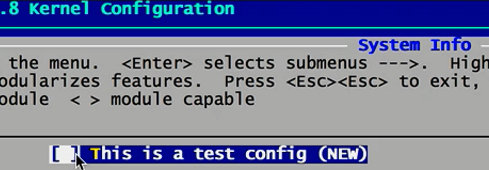
#include #include #include #include 配置内核 1.配置哪些目录需要编译 2.配置哪些文件需要编译 配置方法:Makefile 主目录Makefile: 包含体系结构下的Makefile # Use LINUXINCLUDE when you must reference the include/ directory. # Needed to be compatible with the O= option LINUXINCLUDE := -I$(srctree)/arch/$(hdr-arch)/include -Iarch/$(hdr-arch)/include/generated -Iinclude $(if $(KBUILD_SRC), -I$(srctree)/include) -include include/generated/autoconf.h hdr-arch := $(SRCARCH) #包含体系架构下的Makefile include $(srctree)/arch/$(SRCARCH)/Makefile ARCH ?= arm CROSS_COMPILE ?= /opt/FriendlyARM/toolschain/4.5.1/bin/arm-linux- # Architecture as present in compile.h UTS_MACHINE := $(ARCH) SRCARCH := $(ARCH) # Additional ARCH settings for x86 ifeq ($(ARCH),i386) SRCARCH := x86 endif ifeq ($(ARCH),x86_64) SRCARCH := x86 endif 各个子目录的Makefile 例:arch/arm/mach-s5pv210下的Makefile # arch/arm/mach-s5pv210/Makefile # # Copyright (c) 2010 Samsung Electronics Co., Ltd. # http://www.samsung.com/ # # Licensed under GPLv2 obj-y := obj-m := obj-n := obj- := # Core support for S5PV210 system obj-$(CONFIG_CPU_S5PV210) += cpu.o init.o clock.o dma.o obj-$(CONFIG_CPU_S5PV210) += setup-i2c0.o obj-$(CONFIG_S5PV210_PM) += pm.o sleep.o obj-$(CONFIG_CPU_FREQ) += cpufreq.o # machine support obj-$(CONFIG_MACH_AQUILA) += mach-aquila.o obj-$(CONFIG_MACH_SMDKV210) += mach-smdkv210.o obj-$(CONFIG_MACH_SMDKC110) += mach-smdkc110.o obj-$(CONFIG_MACH_GONI) += mach-goni.o obj-$(CONFIG_MACH_TORBRECK) += mach-torbreck.o # device support obj-y += dev-audio.o obj-$(CONFIG_S3C64XX_DEV_SPI) += dev-spi.o obj-$(CONFIG_S5PV210_SETUP_FB_24BPP) += setup-fb-24bpp.o obj-$(CONFIG_S5PV210_SETUP_FIMC) += setup-fimc.o obj-$(CONFIG_S5PV210_SETUP_I2C1) += setup-i2c1.o obj-$(CONFIG_S5PV210_SETUP_I2C2) += setup-i2c2.o obj-$(CONFIG_S5PV210_SETUP_IDE) += setup-ide.o obj-$(CONFIG_S5PV210_SETUP_KEYPAD) += setup-keypad.o obj-$(CONFIG_S5PV210_SETUP_SDHCI) += setup-sdhci.o obj-$(CONFIG_S5PV210_SETUP_SDHCI_GPIO) += setup-sdhci-gpio.o obj - y := 编译进内核 obj - m := 以模块形式编译 obj - n := 不编译 obj - := 不编译 哪些文件需要编译? CONFIG_XXX 配置单: 在/arch/arm/configs默认目录下 配置过程: 1、导出需要的默认配置文件到主目录下并更名为.config 2、交叉编译器的修改 3、体系结构(System Type)的选择:S5PV210 ARCH ?= arm CROSS_COMPILE ?= /opt/FriendlyARM/toolschain/4.5.1/bin/arm-linux- 4、配置单(.config)增删改查--->使用make menuconfig实现图形化更改配置 Kconfig----> make menuconfig ---> .config ---->Makefile Kconfig语法: source:相当于include描述一包含关系 menu、endmenu:用来定义菜单如: menu 'System Info' end menu 执行make menuconfig 则: .config中增加一条:CONFIG_ABC = y 即config ----> CONFIG_ABC =y---->Makefile中的obj-$(CONFIG_ABC) += xx.o 通过make menuconfig中的-----相应选项的help----->找到相应选项的Kconfig---->Makefile中对应的文件 .c 例如: 找menuconfig下的Samsung SoC serial support定义的(Kconfig)位置: 法一:选中这个选项键盘单击h按键 法二:搜索grep -nR 'Samsung SoC serial support' 同样在Kconfig所在目录下的Makefile文件即可找到对应的.c文件 通过Makefile .o ----->找到Kconfig:同上↑ config:用来配置菜单子目录的内容 menu 'System Info' config ABC bool 'This is a test config' help Support test config endmenu 执行make menuconfig 则: Kconfig配置主线 # For a description of the syntax of this configuration file, # see Documentation/kbuild/kconfig-language.txt. # mainmenu 'Linux/$ARCH $KERNELVERSION Kernel Configuration' config SRCARCH string option env='SRCARCH' source 'arch/$SRCARCH/Kconfig' ---->source “arch/$SRCARCH/Kconfig” config ARM bool default y select HAVE_AOUT select HAVE_DMA_API_DEBUG select HAVE_IDE select HAVE_MEMBLOCK ....... ........... config HAVE_PWM bool config MIGHT_HAVE_PCI bool config SYS_SUPPORTS_APM_EMULATION bool config HAVE_SCHED_CLOCK bool config GENERIC_GPIO bool ............ ................ menu 'Power management options' source 'kernel/power/Kconfig' config ARCH_SUSPEND_POSSIBLE depends on !ARCH_S5P64X0 && !ARCH_S5PC100 depends on CPU_ARM920T || CPU_ARM926T || CPU_SA1100 || CPU_V6 || CPU_V6K || CPU_V7 || CPU_XSC3 || CPU_XSCALE def_bool y endmenu source 'net/Kconfig' source 'drivers/Kconfig' source 'fs/Kconfig' source 'arch/arm/Kconfig.debug' source 'security/Kconfig' source 'crypto/Kconfig' source 'lib/Kconfig' --->source 'net/Kconfig' --->source 'drivers/Kconfig' --->source 'fs/Kconfig' --->source 'arch/arm/Kconfig.debug' --->source 'security/Kconfig' --->source 'crypto/Kconfig' --->source 'lib/Kconfig' 添加驱动到Linux内核中的步骤:以myled.c字符驱动为例 1.可以在/drivers/char/目录下新建文件夹mydriver,然后复制myled.c到mydriver目录 2、在mydriver目录下创建Makefile文件 obj-$(CONFIG_MYLED) += myled.o 3、在上层的Makefile文件添加一句obj-y += mydriver/这样上层Makefile文件就会找到mydriver目录下的Makefile文件 4、在mydriver目录下创建Kconfig文件 menu 'My Personal Device Driver' config MYLED bool 'Support myled device driver' help Support led driver for S5PV210 endmenu 5、在上层的Kconfig文件添加一句source 'driver/char/mydriver/Kconfig'这样上层Kconfig文件就会找到mydriver目录下的Kconfig文件 6、执行make menuconfig 选中My Personal Device Driver --->Support myled device driver之后执行make uImage 重新编译内核即可 内核编译过程 make : make Image make zImage make uImage (专为uboot启动准备的内核镜像 ) //编译的是obj-y make modules //编译的是obj-m make uImage (vmlinux-->Image-->vmlinux-->zImage-->uImage) 直接执行make uImage 报错解决办法: 进入u-boot源码,在编译完成的uboot源码中进入tool目录,找到mkimage文件,将其复制到/bin根目录 vmlinux :OS elf file ---OBJCOPY拷贝生成Image Image:未压缩,所以比较大 zImage:经过压缩的Image文件 自定义BSP的过程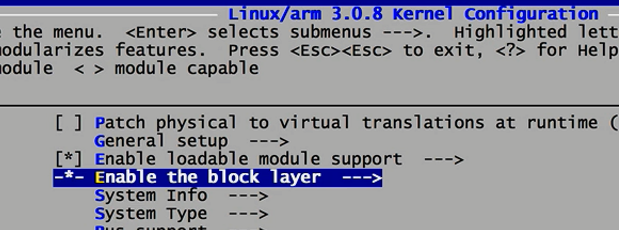
上一篇:linux下的misc设备led示例
下一篇:5.4.9.linux内核的gpiolib学习1
推荐阅读最新更新时间:2026-03-23 10:58

 Linux技术手册
 【2025 DigiKey创意大赛】 学伴智盒 - 代码
 智能机械臂
智能机械臂 现代雷达系统的信号设计
- LDK120M12R 1.2V低压降稳压器典型应用(可调版)电路
- EVB-UTC2000-DFP、EVK-UTC2000 评估套件基于 UTC2000 USB 3.0/2.0 Type-A,即插即用 Type-C DFP
- LTC3219 演示板、250mA 通用九通道 LED 驱动器
- DC919A-D,LTC2204 CMOS 输出演示板,直流输入,40Msps 16 位 ADC,DC
- AD8618ARZ-REEL 二阶低通滤波器运算放大器的典型应用电路
- 使用 NXP Semiconductors 的 PCA9511A 的参考设计
- LT3091MPDE 恒流恒压实验室电源的典型应用
- ADR392B 4.096 Vout 微功率、低噪声精密电压基准的典型应用
- LT3470HDDB 5V 降压转换器的典型应用电路
- 使用 Diodes Incorporated 的 AZ7042ZTR-E1 的参考设计
 BFR340T






 京公网安备 11010802033920号