
移植环境
1,主机环境:VMare下CentOS 5.5 ,1G内存。
2,集成开发环境:Elipse IDE
3,编译编译环境:arm-linux-gcc v4.4.3,arm-none-eabi-gcc v4.5.1。
4,开发板:mini2440,2M nor flash,128M nand flash。
5,u-boot版本:u-boot-2009.08
7.1添加 LCD 显示功能
对于这个 LCD 的支持是参考Openmoko 的代码移植的。Openmoko 的GTA2 使用的是S3C2442 的CPU,在LCD 控制器上是一样的。而GTA2 在U-boot 的可以在LCD 上显示字符,而且对于软件分层的U-boot 来说,只要将底层驱动移植过来并调整好初始化参数就可以在LCD 上显示console。下图是LCD驱动软件分层执行流程示意。可以看到LCD在执行时最终调用的是底层的board_video_init()函数,其主要作用是对LCD控制寄存器进行初始化。可由用户根据实际LCD硬件编写。
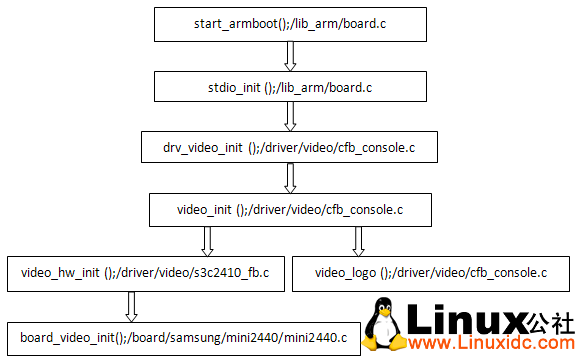
由于友善之臂使用了两种屏,他们在一个参数上有很小的差别,而屏有不可以通过程序去识别,所以只能简单的通过Nand Flash 配置来区分导入的参数(64MB Nand 的板子使用的都是NEC 的,其他的都是统宝的)。这个功能的移植修改了5 个文件(包括drivers/video/Makefile,以及前面已经修改过的board/samsung/mini2440/mini2440.c 文件)。
【1】在/drivers/video/下添加一个驱动文件名为s3c2410_fb.c,将下面内容粘贴进去:
/* #include tmp = 0;
* (C) Copyright 2006 by OpenMoko, Inc.
* Author: Harald Welte
*
* This program is free software; you can redistribute it and/or
* modify it under the terms of the GNU General Public License as
* published by the Free Software Foundation; either version 2 of
* the License, or (at your option) any later version.
*
* This program is distributed in the hope that it will be useful,
* but WITHOUT ANY WARRANTY; without even the implied warranty of
* MERCHANTABILITY or FITNESS FOR A PARTICULAR PURPOSE. See the
* GNU General Public License for more details.
*
* You should have received a copy of the GNU General Public License
* along with this program; if not, write to the Free Software
* Foundation, Inc., 59 Temple Place, Suite 330, Boston,
* MA 02111-1307 USA
*/
#if defined(CONFIG_VIDEO_S3C2410)
#include
#include 'videomodes.h'
#include
/*
* Export Graphic Device
*/
GraphicDevice smi;
#define VIDEO_MEM_SIZE 0x200000 /* 240x320x16bit = 0x25800 bytes */
extern void board_video_init(GraphicDevice *pGD);
/*******************************************************************************
*
* Init video chip with common Linux graphic modes (lilo)
*/
void *video_hw_init (void)
{
S3C24X0_LCD * const lcd = S3C24X0_GetBase_LCD();
GraphicDevice *pGD = (GraphicDevice *)&smi;
int videomode;
unsigned long t1, hsynch, vsynch;
char *penv;
int tmp, i, bits_per_pixel;
struct ctfb_res_modes *res_mode;
struct ctfb_res_modes var_mode;
// unsigned char videoout;
/* Search for video chip */
printf('Video: ');
videomode = CFG_SYS_DEFAULT_VIDEO_MODE;
/* get video mode via environment */
if ((penv = getenv ('videomode')) != NULL) {
/* deceide if it is a string */
if (penv[0] <= '9') {
videomode = (int) simple_strtoul (penv, NULL, 16);
tmp = 1;
}
} else {
tmp = 1;
}
if (tmp) {
/* parameter are vesa modes */
/* search params */
for (i = 0; i < VESA_MODES_COUNT; i++) {
if (vesa_modes[i].vesanr == videomode)
break;
}
if (i == VESA_MODES_COUNT) {
printf ('no VESA Mode found, switching to mode 0x%x ', CFG_SYS_DEFAULT_VIDEO_MODE);
i = 0;
}
res_mode =
(struct ctfb_res_modes *) &res_mode_init[vesa_modes[i].
resindex];
bits_per_pixel = vesa_modes[i].bits_per_pixel;
} else {
res_mode = (struct ctfb_res_modes *) &var_mode;
bits_per_pixel = video_get_params (res_mode, penv);
}
/* calculate hsynch and vsynch freq (info only) */
t1 = (res_mode->left_margin + res_mode->xres +
res_mode->right_margin + res_mode->hsync_len) / 8;
t1 *= 8;
t1 *= res_mode->pixclock;
t1 /= 1000;
hsynch = 1000000000L / t1;
t1 *=
(res_mode->upper_margin + res_mode->yres +
res_mode->lower_margin + res_mode->vsync_len);
t1 /= 1000;
vsynch = 1000000000L / t1;
/* fill in Graphic device struct */
sprintf (pGD->modeIdent, '%dx%dx%d %ldkHz %ldHz', res_mode->xres,
res_mode->yres, bits_per_pixel, (hsynch / 1000),
(vsynch / 1000));
printf ('%sn', pGD->modeIdent);
pGD->winSizeX = res_mode->xres;
pGD->winSizeY = res_mode->yres;
pGD->plnSizeX = res_mode->xres;
pGD->plnSizeY = res_mode->yres;
switch (bits_per_pixel) {
case 8:
pGD->gdfBytesPP = 1;
pGD->gdfIndex = GDF__8BIT_INDEX;
break;
case 15:
pGD->gdfBytesPP = 2;
pGD->gdfIndex = GDF_15BIT_555RGB;
break;
case 16:
pGD->gdfBytesPP = 2;
pGD->gdfIndex = GDF_16BIT_565RGB;
break;
case 24:
pGD->gdfBytesPP = 3;
pGD->gdfIndex = GDF_24BIT_888RGB;
break;
}
/* statically configure settings */
pGD->winSizeX = pGD->plnSizeX = 240;
pGD->winSizeY = pGD->plnSizeY = 320;
pGD->gdfBytesPP = 2;
pGD->gdfIndex = GDF_16BIT_565RGB;
pGD->frameAdrs = LCD_VIDEO_ADDR;
pGD->memSize = VIDEO_MEM_SIZE;
board_video_init(pGD);
lcd->LCDSADDR1 = pGD->frameAdrs >> 1;
/* This marks the end of the frame buffer. */
lcd->LCDSADDR2 = (lcd->LCDSADDR1&0x1fffff) + (pGD->winSizeX+0) * pGD->winSizeY;
lcd->LCDSADDR3 = (pGD->winSizeX & 0x7ff);
/* Clear video memory */
memset((void *)pGD->frameAdrs, 0, pGD->memSize);
/* Enable Display */
lcd->LCDCON1 |= 0x01; /* ENVID = 1 */
return ((void*)&smi);
}
void
video_set_lut (unsigned int index, /* color number */
unsigned char r, /* red */
unsigned char g, /* green */
unsigned char b /* blue */
)
{
}
#endif /* CONFIG_VIDEO_S3C2410 */


上一篇:u-boot-2009.08在mini2440上的移植 增加DM9000网卡驱动
下一篇:u-boot-2009.08在mini2440上的移植 增加USB功能
推荐阅读最新更新时间:2026-02-21 13:16

 【Follow me第三季第2期】FRDM-MCXN947 任务源码汇总帖下载
 CANopen移植工程(源代码)
 uCOS-II移植到STM32的详细步骤
 现代雷达系统的信号设计
- 使用 ROHM Semiconductor 的 BU4946 的参考设计
- L7805A 高输入电压电路的典型应用(配置 2)
- LT8610 的典型应用 - 具有 2.5 uA 静态电流的 42V、2.5A 同步降压型稳压器
- 具有固定输出电压、1.5V 的典型应用电路,适用于 ADP1740 2A 低 VIN、低压差线性稳压器
- ADA4505-1ARJZ-R7 脉搏血氧计红色和红外电流源的典型应用电路,使用电压基准器件的缓冲器
- LTC3890IUH 高效双路 12V/5V 降压转换器的典型应用电路
- L7885C 功率 AM 调制器的典型应用(单位电压增益,IO = 0.5)
- L7812A 具有短路保护的高输出电流的典型应用
- 使用 MaxLinear, Inc 的 SPX2840 的参考设计
- LT3957IUHE、5V 至 16V 输入、-12V 输出反相转换器的典型应用电路
 BFR340T






 京公网安备 11010802033920号