
OpenHarmony 系统移植最核心的步骤是内核的移植,内核的稳定是一切子系统稳定的基础,上一篇我们讲述了内核启动原理,以及 vendor、board 的开发配置,本文将介绍 SoC 层级的移植适配流程。
SoC 适配
SoC 配置芯片层级编译依赖库,包括 CMSIS、HAL(硬件抽象层)等,这里包含操作总线、串口、时钟、寄存等库函数。
①创建对应的文件目录结构
目录名称按照芯片厂家、芯片型号来创建,比如 st 公司下的 stm32f4xx 系列芯片。
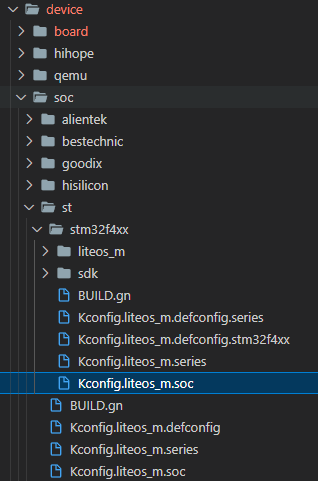
配置文件内容如下:
device/soc/st/stm32f4xx/Kconfig.liteos_m.defconfig.series
if SOC_SERIES_STM32F4xx
rsource 'Kconfig.liteos_m.defconfig.stm32f4xx'
config SOC_SERIES
string
default 'stm32f4xx'
endif
device/soc/st/stm32f4xx/Kconfig.liteos_m.defconfig.stm32f4xx
config SOC
string
default 'stm32f4xx'
depends on SOC_STM32F4xx
device/soc/st/stm32f4xx/Kconfig.liteos_m.series
config SOC_SERIES_STM32F4xx
bool 'STMicroelectronics STM32F4xx series'
select ARCH_ARM
select SOC_COMPANY_STMICROELECTRONICS
select CPU_CORTEX_M4
help
Enable support for STMicroelectronics STM32F4xx series
device/soc/st/stm32f4xx/Kconfig.liteos_m.soc
choice
prompt 'STMicroelectronics STM32F4xx series SoC'
depends on SOC_SERIES_STM32F4xx
config SOC_STM32F407
bool 'SoC STM32F407'
Endchoice
device/soc/st/Kconfig.liteos_m.defconfig
rsource '*/Kconfig.liteos_m.defconfig.series'
device/soc/st/Kconfig.liteos_m.defconfig
rsource '*/Kconfig.liteos_m.series'
device/soc/st/Kconfig.liteos_m.soc
config SOC_COMPANY_STMICROELECTRONICS
bool
if SOC_COMPANY_STMICROELECTRONICS
config SOC_COMPANY
default 'st'
rsource '*/Kconfig.liteos_m.soc'
endif # SOC_COMPANY_STMICROELECTRONICS
device/soc/st/BUILD.gn
if (ohos_kernel_type == 'liteos_m') {
import('//kernel/liteos_m/liteos.gni')
module_name = get_path_info(rebase_path('.'), 'name')
module_group(module_name) {
modules = [ 'stm32f4xx' ]
}
}
device/soc/st/stm32f4xx/BUILD.gn
if (ohos_kernel_type == 'liteos_m') {
import('//kernel/liteos_m/liteos.gni')
module_name = get_path_info(rebase_path('.'), 'name')
module_group(module_name) {
modules = [ 'liteos_m', 'sdk' ]
}
}
②移植 HAL 库函数等文件
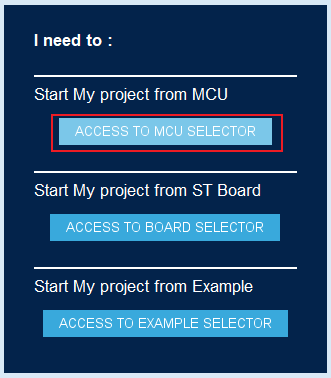
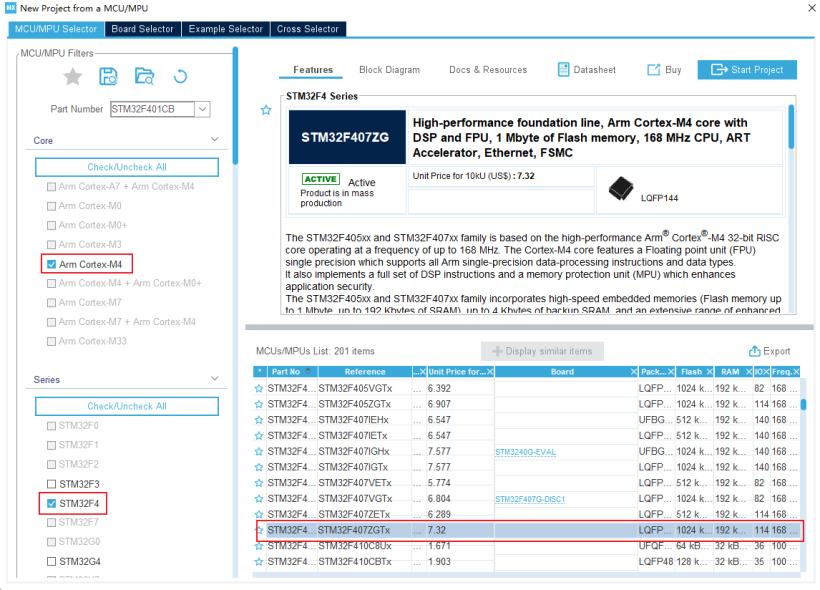
对于 STM32F407 我们可以使用官方的 STM32CubeMX 生成对应的标准的 hal 库函数文件。
选择 ACCESS TO MCU SELECTOR:
勾选 Arm Cortex-M4→STM32F4→STM32F407ZGTx:
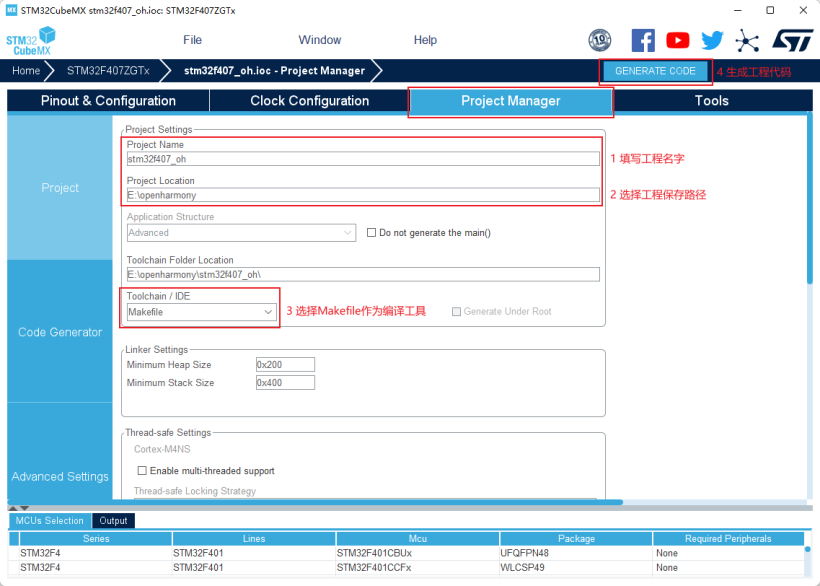
填写工程名称,选择工程保存路径,选择 Makefile 作为编译工具,点击 GENERATE CODE 生成工程代码。
使用 vscode 打开目录,我们得到如下工程:
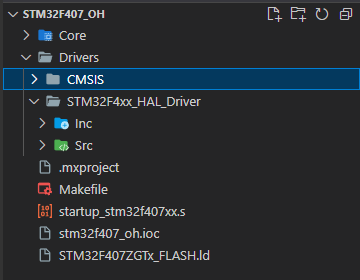
回顾一下之前讲过的系统启动的流程:
HAL 初始化
系统时钟初始化
系统初始化
系统启动
接下来我们将 HAL 库函数文件及芯片头文件迁移到 OH 代码中,文件路径如下:
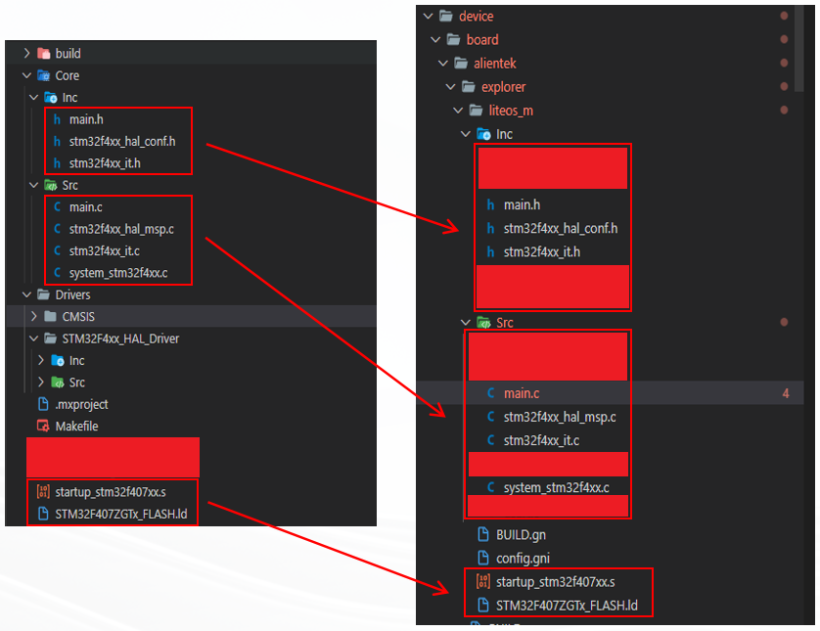
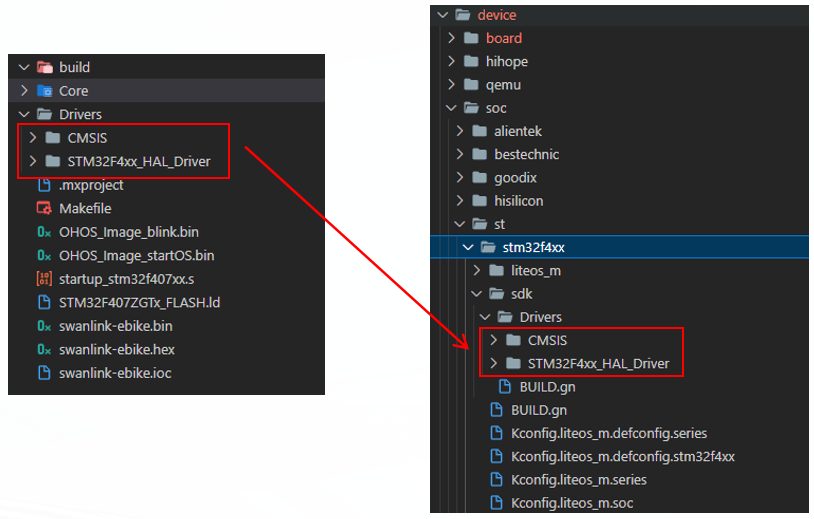
将 Drivers 中的 CMSIS、STM32F4xx_HAL_Driver 复制到 /device/soc/st/stm32f4xx/sdk/Drivers 中。
③修改系统编译配置文件
使用 OH 的 gn 以及 config 文件配置系统编译流程以及包依赖关系,涉及到的配置文件如下:
device/board/alientek/explorer/liteos_m/config.gni# Kernel
type, e.g. 'linux', 'liteos_a', 'liteos_m'.kernel_type = 'liteos_m'# Kernel version.kernel_version = '3.0.0'# Board CPU
type, e.g. 'cortex-a7', 'riscv32'.board_cpu = 'cortex-m4'# Board arch, e.g. 'armv7-a', 'rv32imac'.board_arch = ''# Toolchain name used
for system compiling.# E.g. gcc-arm-none-eabi, arm-linux-harmonyeabi-gcc, ohos-clang, riscv32-unknown-elf.# Note: The default toolchain is 'ohos-clang'.
It's not mandatory if you use the default toolchain.board_toolchain = 'arm-none-eabi-gcc'use_board_toolchain = true# The toolchain path installed, it's
not mandatory
if you have added toolchain
path to your ~/.bashrc.board_toolchain_path = ''#
Compiler prefix.board_toolchain_prefix = 'arm-none-eabi-'# Compiler
type, 'gcc'
or 'clang'.board_toolchain_type = 'gcc'
#Debug compiler optimization level optionsboard_opt_flags = ['-mcpu=cortex-m4','-mthumb','-mfpu=fpv4-sp-d16','-mfloat-abi=hard',]#
Board related common compile flags.board_cflags = ['-Og','-Wall','-fdata-sections','-ffunction-sections','-DSTM32F407xx','-DHAL_UART_MODULE_ENABLED']
board_cflags += board_opt_flagsboard_asmflags = ['-Og','-Wall','-fdata-sections','-ffunction-sections',]
board_asmflags += board_opt_flagsboard_cxx_flags = board_cflagsboard_ld_flags = ['-T${ohos_root_path}device/board/alientek/explorer/liteos_m/STM32F407ZGTx_FLASH.ld']
board_ld_flags += board_opt_flags# Board related headfiles search
path.board_include_dirs = [ '//utils/native/lite/include' ]# Board adapter dir
for OHOS components.board_adapter_dir = ''这里的核心工作就是将原有的Makefile编译文件翻译成OH的
config.gni,可以看到有很多的编译参数以及宏变量定义。
修改编译依赖文件BUILD.gndevice/board/alientek/explorer/liteos_m/BUILD.gnimport('//kernel/liteos_m/liteos.gni')
module_name = get_path_info(rebase_path('.'), 'name')
kernel_module(module_name)
{sources = ['startup_stm32f407xx.s','Src/main.c','Src/delay.c','Src/led.c','Src/sys.c','Src/usart.c','Src/stm32f4xx_hal_msp.c','
Src/stm32f4xx_it.c','Src/system_stm32f4xx.c',
]include_dirs = [ 'Inc',]}# '-Wl,-T' + rebase_path('STM32F407ZGTx_FLASH.ld'),
config('public') {ldflags = ['-Wl,-u_printf_float']libs = ['c','m','nosys',]}
device/soc/st/stm32f4xx/sdk/BUILD.gnimport('//kernel/liteos_m/liteos.gni')
module_name = 'stm32f4xx_sdk'kernel_module(module_name)
{asmflags = board_asmflagssources = ['Drivers/STM32F4xx_HAL_Driver/Src/stm32f4xx_hal_rcc.c','
Drivers/STM32F4xx_HAL_Driver/Src/stm32f4xx_hal_rcc_ex.c','Drivers/STM32F4xx_HAL_Driver/Src/stm32f4xx_hal_gpio.c','
Drivers/STM32F4xx_HAL_Driver/Src/stm32f4xx_hal_dma_ex.c','
Drivers/STM32F4xx_HAL_Driver/Src/stm32f4xx_hal_dma.c','
Drivers/STM32F4xx_HAL_Driver/Src/stm32f4xx_hal_cortex.c','Drivers/STM32F4xx_HAL_Driver/Src/stm32f4xx_hal.c','
Drivers/STM32F4xx_HAL_Driver/Src/stm32f4xx_hal_exti.c','Drivers/STM32F4xx_HAL_Driver/Src/stm32f4xx_hal_uart.c',]
include_dirs = ['//device/board/alientek/explorer/liteos_m/Inc']}#指定全局头文件搜索路径
config('public') {include_dirs = ['Drivers/STM32F4xx_HAL_Driver/Inc','Drivers/CMSIS/Device/ST/STM32F4xx/Include',]}
④改造 main 函数,拉起系统内核
我们对 device/board/alientek/explorer/liteos_m/Src/main.c 文件进行如下编辑:
int main(void)
{
HAL_Init(); /* 初始化HAL库 */
sys_stm32_clock_init(336, 8, 2, 7); /* 初始化时钟频率168Mhz */
delay_init(168); /* 延时初始化 */
printf('hal、系统始终初始化完毕,开始启动系统...
');
RunTask();
}
void RunTask()
{
unsigned int ret;
ret = LOS_KernelInit(); // 初始化LiteOS系统
if (ret != LOS_OK)
{
printf('Liteos kernel init failed! ERROR: 0x%x
', ret);
}
else
{
LOS_Start(); // 启动系统
}
...
}
编译与烧录
使用 hb 工具进行编译,hb set 选择编译目标,hb build -f 执行编译。
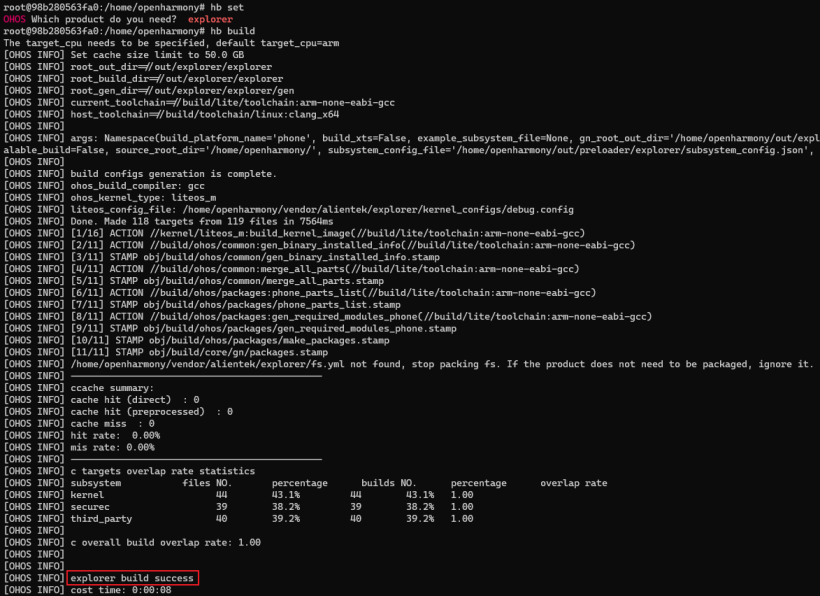
日志输出 explorer build success 表示编译成功。 编译过程中可能会遇到缺少某些结构体或者函数的定义,需要细心排查,注意宏定义是否打开。 STM32F407 开发板支持串口和 ST-LINK 烧录方式,但 OH 编译出来的是 bin 文件,bin 无法直接通过串口烧录。
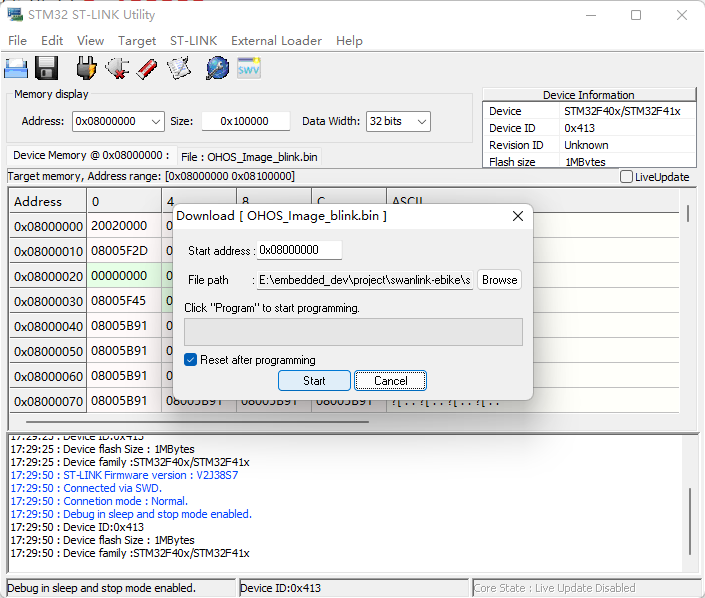
需要用到 ST-LINK 工具进行烧录,烧录时需要指定 flash,开始地址:0x08000000,大小:0x100000。
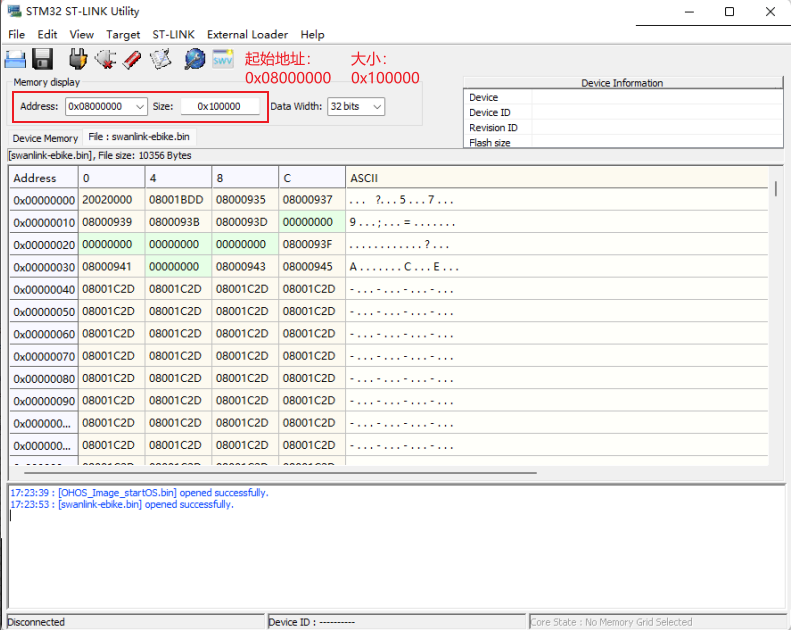
开始烧录:
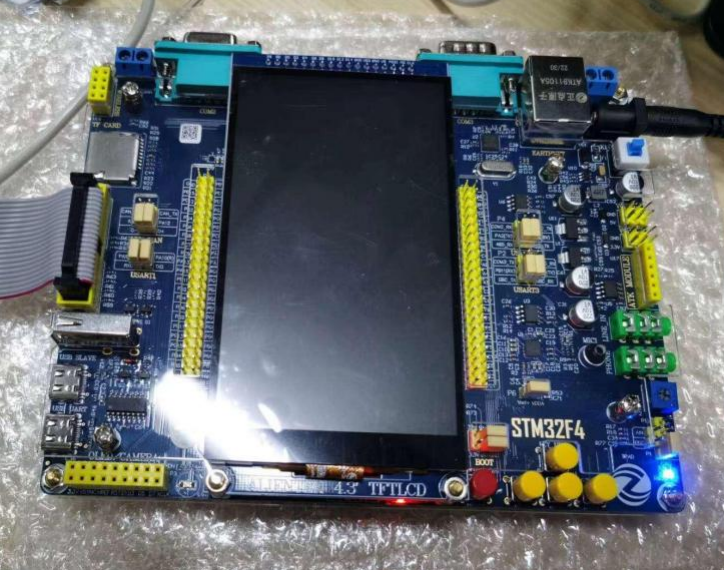
点亮开发板:
总结
本文主要讲述了 OpenHarmony 内核的 SoC 代码移植。因为 STM32F407 的架构和基础 SDK 都是官方开源的,所以移植工作也较为容易。 但在实际工作中如果遇到未开源的芯片,那么需要模组或芯片厂商提供技术支持才可完成移植工作。 到这里瘦设备 OH 适配的最核心工作已完成,希望能对热爱 OpenHarmony 的小伙伴有所帮助。
上一篇:将KEIL软件中数组数据导出的简单方法
下一篇:CH9434嵌入式Linux与安卓系统驱动移植和使用教程
推荐阅读最新更新时间:2026-02-21 11:54

 【Follow me第三季第2期】FRDM-MCXN947 任务源码汇总帖下载
 CANopen移植工程(源代码)
 uCOS-II移植到STM32的详细步骤
 现代雷达系统的信号设计
- 使用 ROHM Semiconductor 的 BU4946 的参考设计
- L7805A 高输入电压电路的典型应用(配置 2)
- LT8610 的典型应用 - 具有 2.5 uA 静态电流的 42V、2.5A 同步降压型稳压器
- 具有固定输出电压、1.5V 的典型应用电路,适用于 ADP1740 2A 低 VIN、低压差线性稳压器
- ADA4505-1ARJZ-R7 脉搏血氧计红色和红外电流源的典型应用电路,使用电压基准器件的缓冲器
- LTC3890IUH 高效双路 12V/5V 降压转换器的典型应用电路
- L7885C 功率 AM 调制器的典型应用(单位电压增益,IO = 0.5)
- L7812A 具有短路保护的高输出电流的典型应用
- 使用 MaxLinear, Inc 的 SPX2840 的参考设计
- LT3957IUHE、5V 至 16V 输入、-12V 输出反相转换器的典型应用电路
 BFR340T






 京公网安备 11010802033920号